Family site
Family site
Family site



Most enterprise software does not fail because the code is bad. It fails because of decisions made, or skipped, before a single line was written: treating a business capability gap as a technology project, copying an inefficient manual process directly into software, picking an architecture because it is fashionable rather than because it fits the problem.
Panorama Consulting's 2025 research on ERP (enterprise resource planning) implementations puts the overall failure rate at 68%. Gartner's global CIO survey found only 48% of digital initiatives meet or exceed their business outcome targets. Change management and unclear requirements keep showing up as the leading cause in both, not raw coding ability.
This guide covers what enterprise application development actually involves: when a business needs it, how to decide between building, buying or customizing, what the development process looks like in practice, and how to measure whether the result was worth it.
Back to topEnterprise application development is the process of designing, building, integrating, deploying and continuously improving software that supports complex business processes across an organization. That definition matters because it draws the line between "enterprise" and "regular" software on complexity of context, not size of codebase.
A simple app can technically work while still failing enterprise requirements. Enterprise applications carry constraints a standalone tool never faces:
Miss any one of these and the application can still demo well and still fail in production. It cannot integrate reliably. It cannot scale past the first few hundred users. Employees route around it and go back to spreadsheets.
The table below compares standard applications and enterprise applications across the dimensions that actually change how you build them.
Dimension | Standard application | Enterprise application |
Users | Individuals or limited teams | Multiple departments and business units |
Business logic | Relatively focused | Complex, cross-functional |
Integrations | Limited | Multiple internal and external systems |
Security | Standard application security | Identity, RBAC (role-based access control), auditability, compliance |
Availability | Moderate tolerance for disruption | Often mission-critical |
Data | Application-specific | Distributed across the enterprise |
Lifecycle | Shorter, easier to replace | Often operated for many years |
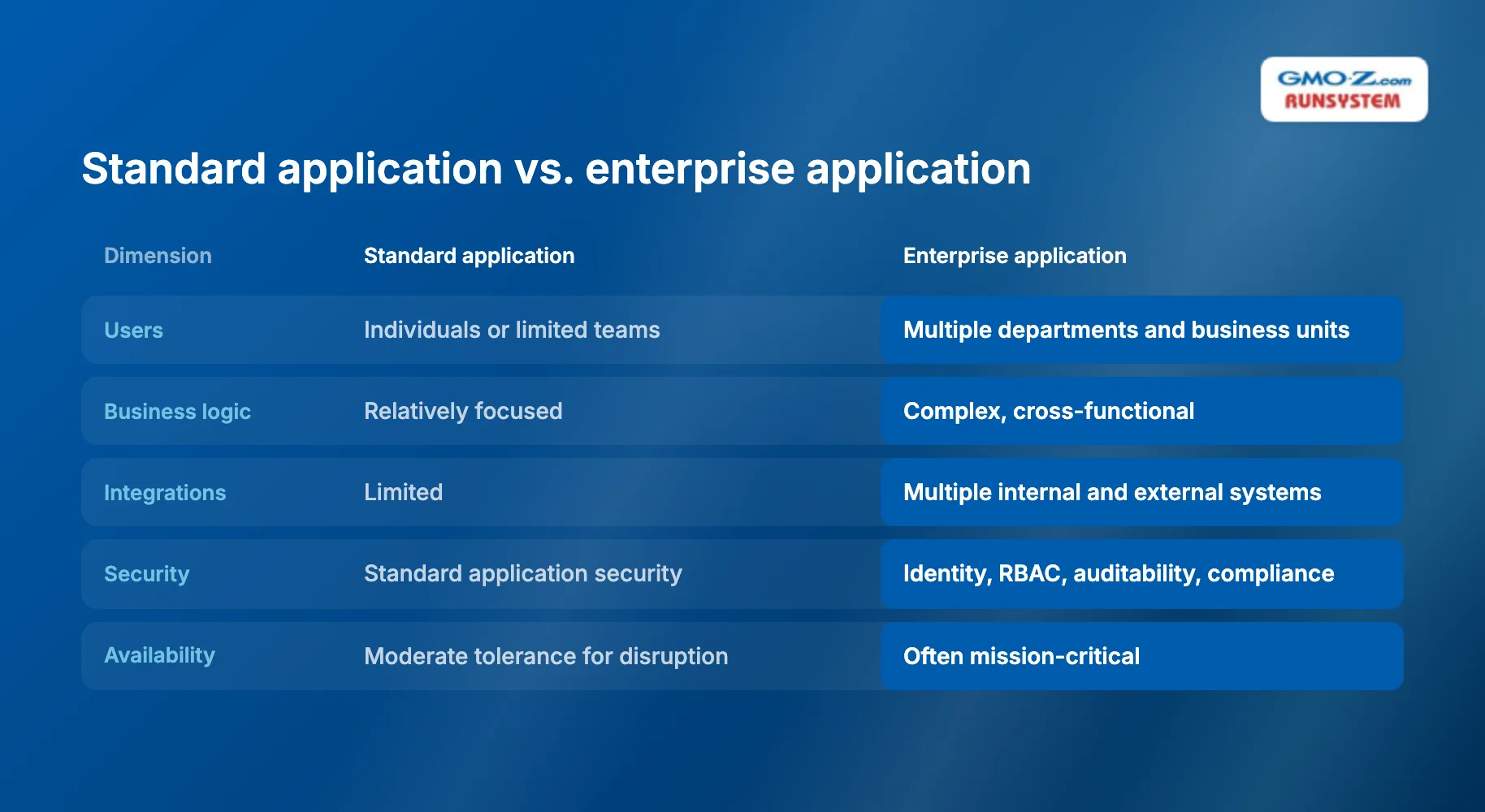
A standard application optimizes for shipping a feature fast. An enterprise application optimizes for something harder: surviving contact with a hundred other systems, a compliance audit, a decade of organizational change. Different engineering problem. Not a scaled-up version of the same one.
The traditional approach treated enterprise development as a multi-year, big-bang project. Gather every requirement up front, build for eighteen months, then launch once and hope the business has not changed in the meantime. That model produced exactly the failure pattern the statistics above describe, since by the time the system shipped, the business it was built for no longer existed in the same form.
The modern approach treats enterprise development as continuous and modular instead: teams ship vertical slices of business value early, validate with real users, integrate incrementally using cloud-native infrastructure and CI/CD (continuous integration and continuous delivery) pipelines. It is a direct response to the same root causes behind the failure data above, poor change management and integration surprises discovered late.
Back to topA business needs enterprise application development when existing tools start constraining operations rather than supporting them, not when a new framework or technology becomes available. That distinction matters. Most enterprise development failures trace back to starting from the wrong trigger, a desire to modernize, rather than an identified gap in business capability.
Four patterns typically signal the shift from "buy more SaaS (software-as-a-service)" to "build or heavily customize."
Teams lean on spreadsheets, email and manual handoffs to bridge gaps between tools that were never designed to talk to each other. Employees build informal workarounds for SaaS limitations. A single business process ends up spanning several disconnected tools with no shared source of truth.
Customer, operational or financial data lives in silos across departments, so staff manually re-enter the same information into multiple systems, and different teams end up working from conflicting versions of the same record. Large enterprises manage an average of 897 applications, yet only 29% are actually integrated, according to MuleSoft's 2025 Connectivity Benchmark Report. That gap, between how many applications exist and how many are actually connected, is the same fragmentation pattern that pushes a business toward custom integration work instead of another point solution.
Existing applications are difficult to integrate with newer platforms, releases become slow and risky, and technical debt blocks new products or processes. McKinsey's CIO survey found that companies with $1 billion or more in revenue divert 10% to 20% of their technology budget meant for new products toward resolving technical debt. That is budget the business intended for growth, quietly spent on standing still instead. Growth compounds the same problem: more users and transactions strain systems sized for a smaller operation, and expansion into new countries or business units demands capabilities that off-the-shelf configuration cannot satisfy.
Enterprise application development should start with a business capability gap, one of the patterns above, not a desire to adopt a new framework. Projects that start from "we should modernize" instead of "this workflow is broken" struggle to define success later. There was never a business problem to measure the result against.
Back to topEnterprise applications fall into a handful of recurring categories, each solving a distinct operational problem rather than competing for the same use case.
Enterprise application | Primary business purpose | Typical integrations |
ERP | Finance, procurement, operations | Accounting, supply chain, HR |
CRM | Customer and sales management | Marketing, billing, support |
SCM | Supply-chain operations | ERP, logistics, inventory |
HRMS | Workforce management | Payroll, identity, finance |
BI and analytics | Business reporting and decisions | Data warehouse, ERP, CRM |
Workflow and automation | Cross-department processes | Multiple enterprise systems |
Industry-specific systems | Core industry operations | Legacy and external platforms |
Modern enterprise development is no longer limited to these traditional ERP and CRM (customer relationship management) categories. It also covers internal operations portals, partner platforms, customer self-service systems, industry-specific builds like clinical healthcare platforms and manufacturing applications tied to a physical production line. The common thread is not the industry; it is that a standard application could not hold the organization's actual complexity.
Back to top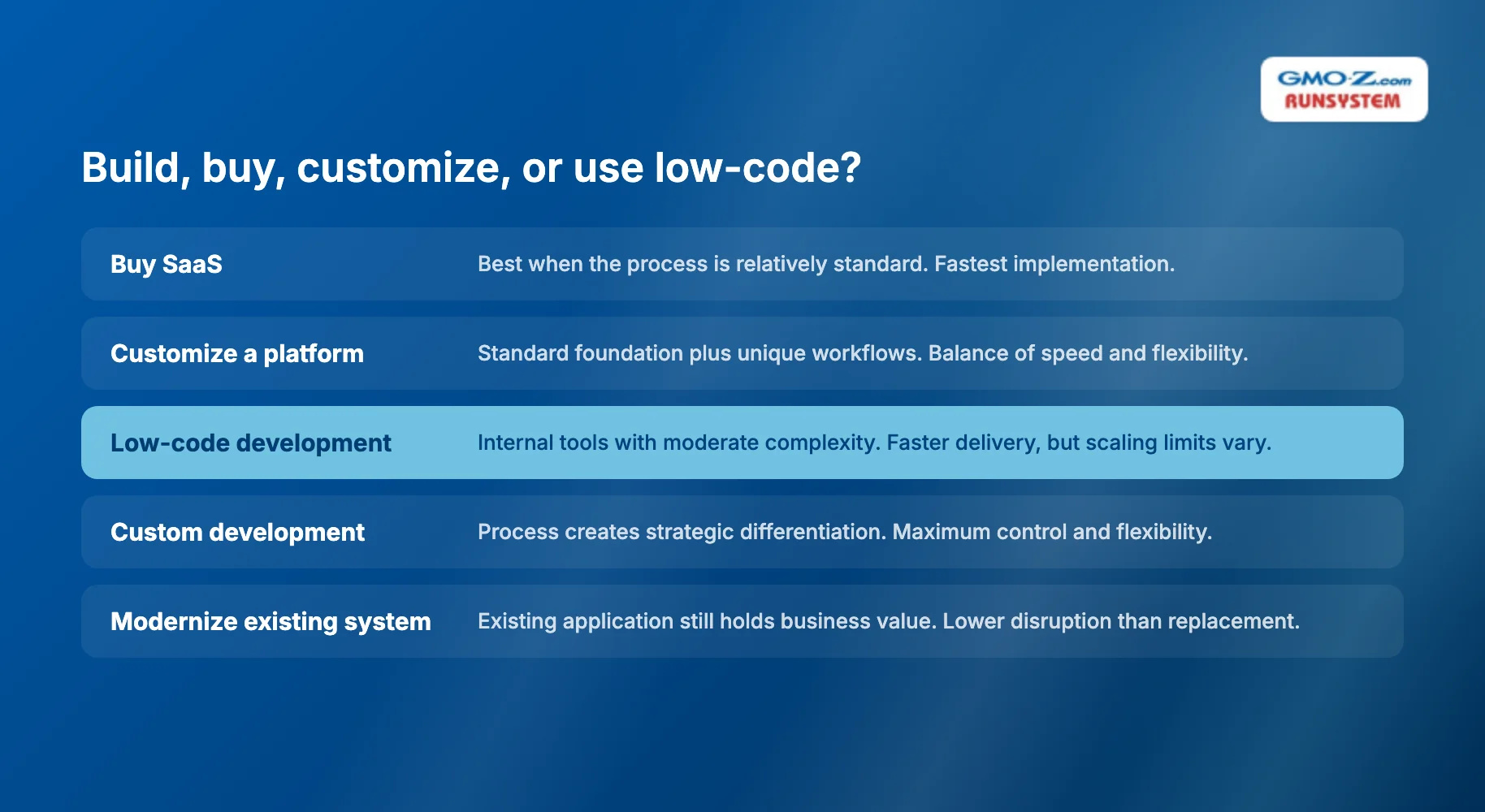
Before deciding how to develop an enterprise application, decide whether you should build one at all. Made before architecture or vendor selection, this single decision determines more of the project's eventual cost and risk than any technical choice that follows it. The table below frames it by fit, not by preference for one method over another.
Approach | Best when | Main advantage | Main risk |
Buy SaaS | Process is relatively standard | Fastest implementation | Workflow and vendor constraints |
Customize enterprise platform | Standard foundation plus unique workflows | Balance of speed and flexibility | Platform dependency |
Low-code development | Workflow or internal tools with moderate complexity | Faster delivery | Scaling and customization limits vary by platform |
Custom development | Process creates strategic differentiation | Maximum control and flexibility | Higher development responsibility |
Modernize existing system | Existing application still holds business value | Lower disruption than replacement | Legacy constraints remain |
Low-code is worth calling out specifically because its adoption curve is steep enough to distort the decision. Gartner forecast that by 2025, roughly 70% of new applications would use low-code or no-code platforms, up from under 25% in 2020. That does not mean low-code has become the default for enterprise systems generally. It has become the default for internal tools, operational dashboards and approval workflows. Performance-critical systems and customer-facing platforms that differentiate the business still run on traditional custom codebases.
Custom development is the stronger choice when the workflow is strategically unique to how the business competes, when deep legacy integration is required that no vendor connector covers, or when security and data control requirements fall outside what a shared multi-tenant platform can guarantee. Building from scratch is not a virtue on its own, though. Avoid custom-building commodity payroll processing, standard CRM functionality, authentication, generic document storage: a mature platform has already solved those at lower cost and risk than a first-time internal build would.
Build what differentiates the business. Buy or reuse what does not. Most enterprise software budgets get this backwards, custom-building the commodity functions because they seem simple, then under-investing in the genuinely differentiating system because it looks complex and gets deprioritized.
Back to top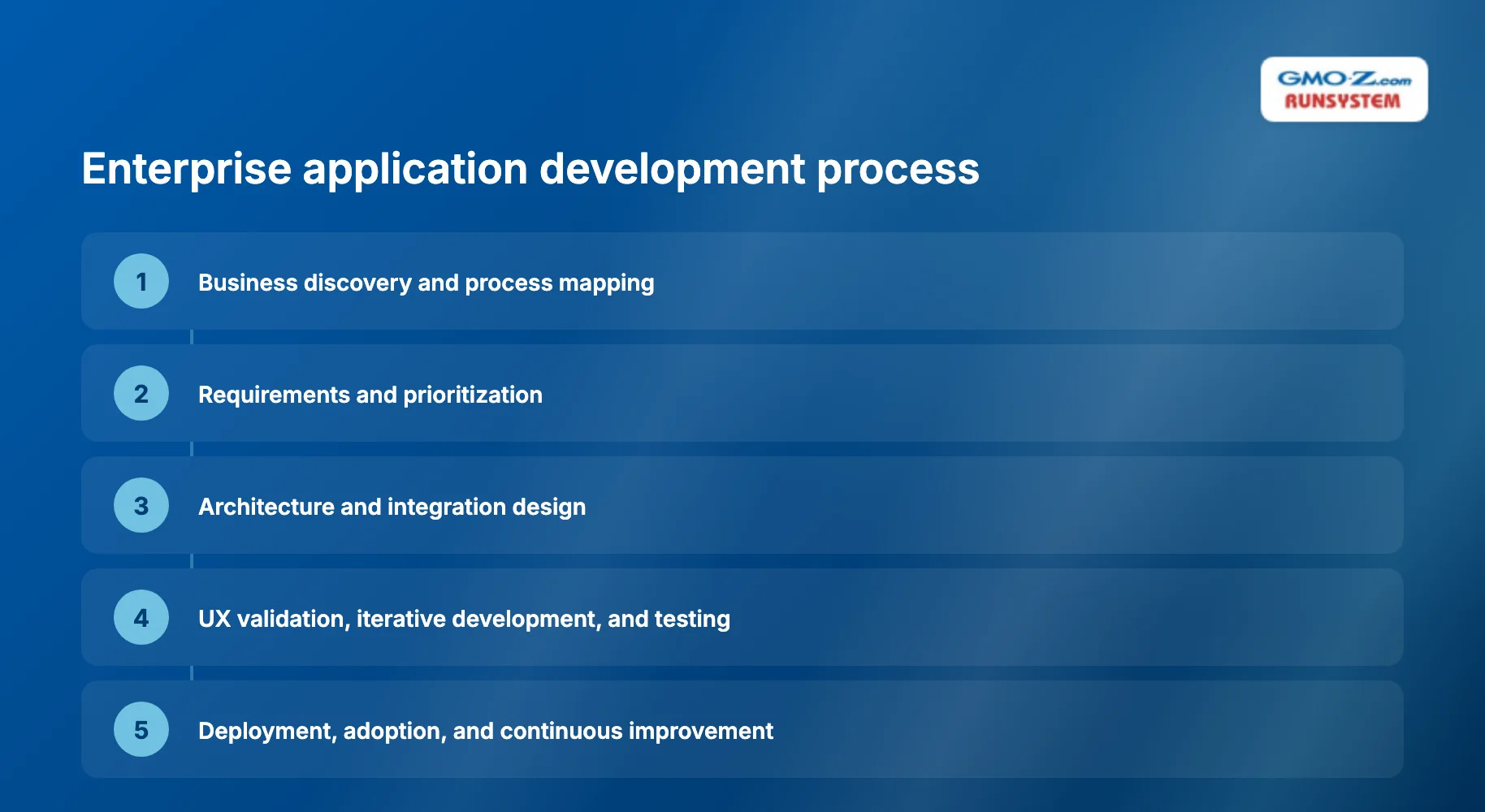
Enterprise application development is not a linear sequence where each phase finishes before the next begins. It is iterative. But a handful of decisions, particularly around integration and non-functional requirements, have to be resolved early, because reversing them later gets expensive fast.
Discovery identifies the business objective, the existing workflow, the pain points, and the outcomes the business actually expects. Map the current state against the desired state before defining a single feature. Skip this step and inefficient manual processes get faithfully copied into software, the same bottleneck preserved in digital form.
Split requirements into two categories:
Non-functional requirements are what typically separate enterprise development from ordinary application development. A prototype can look finished while having none of them defined, which is exactly why they need to be scoped this early.
This phase determines system boundaries, core domains, data ownership and API design, plus how the system integrates with legacy applications and whether it runs on cloud or on-premise infrastructure. Avoid selecting microservices simply because the architecture is considered modern. The architecture section below covers why that default choice creates more risk than it removes.
Enterprise UX (user experience) should optimize for task completion and reduced training time, not visual polish alone, so prototype critical workflows with actual users before full implementation. Delivery should then use agile methods, automated testing and CI/CD pipelines, prioritizing vertical slices of business value over finishing isolated technical layers first. Testing has to go beyond functional correctness too: integration, performance, security, failover. A feature that passes functional testing can still fail in production if no one has tested it under real integration load.
Deployment is not the finish line. Plan for data migration, rollout strategy, training and continuous optimization after launch. This is also where adoption gets decided, and industry benchmarks commonly place successful enterprise implementation in the 15% to 25% active-adoption range, well below the 60%-plus top B2B SaaS products achieve. That gap shows how much can still go wrong after a technically successful deployment.
Back to topArchitecture decisions should follow the complexity of the problem, not the popularity of a pattern. The table below compares the main options by fit rather than by how current each one looks on a conference agenda.
Architecture | Best fit | Watch out for |
Modular monolith | New applications with evolving domains | Requires disciplined module boundaries |
Microservices | Independent domains and teams at significant scale | Distributed-system complexity |
Event-driven | Real-time workflows and loosely coupled systems | Event consistency and observability |
Serverless | Event-driven or variable workloads | Platform constraints and operational visibility |
The best enterprise architecture is the simplest one that reliably satisfies current requirements while leaving realistic room for change. Do not default to microservices as the standard enterprise architecture. Roughly 42% of organizations that initially adopted microservices have since consolidated some services back into larger deployable units, citing debugging complexity, operational overhead and network latency, according to a 2025 CNCF survey. That reversal is about as clear as evidence gets: architecture chosen for its reputation, rather than the problem's actual complexity, tends to create the operational burden it was supposed to solve.
Enterprise stacks vary by requirement, but common building blocks include:
Treat this as a starting point, not a shopping list. The right choice comes from the requirements defined during discovery, not from whichever stack appears most often in job postings. A stack chosen for hiring convenience instead of workload fit tends to resurface as a rewrite three years later.
Back to topSecurity, integration and data governance function as architecture, not as a checklist to complete before launch. Treating them as late-stage add-ons is one of the most consistent patterns behind expensive rework in enterprise projects.
Plan identity and access management from the architecture phase: single sign-on, role-based access control, least-privilege defaults. Retrofitting access control after launch usually means redesigning core data models, not just adding a permissions screen. Build security into delivery the same way, through secure coding practices and dependency scanning that run continuously, rather than a review squeezed in right before launch. Findings that surface that late almost always mean delay, rework, or shipping with known gaps.
Enterprise systems routinely interact with legacy applications, ERP and CRM platforms, identity providers and third-party APIs. Design integration points for retries, failure handling and API versioning from the start. An integration that only works when every upstream system behaves perfectly will fail on the first outage.
Pair that with clear data governance, defined before data starts flowing between systems:
Skip it, and the fragmentation problem that justified building the application in the first place tends to reappear inside it.
Back to top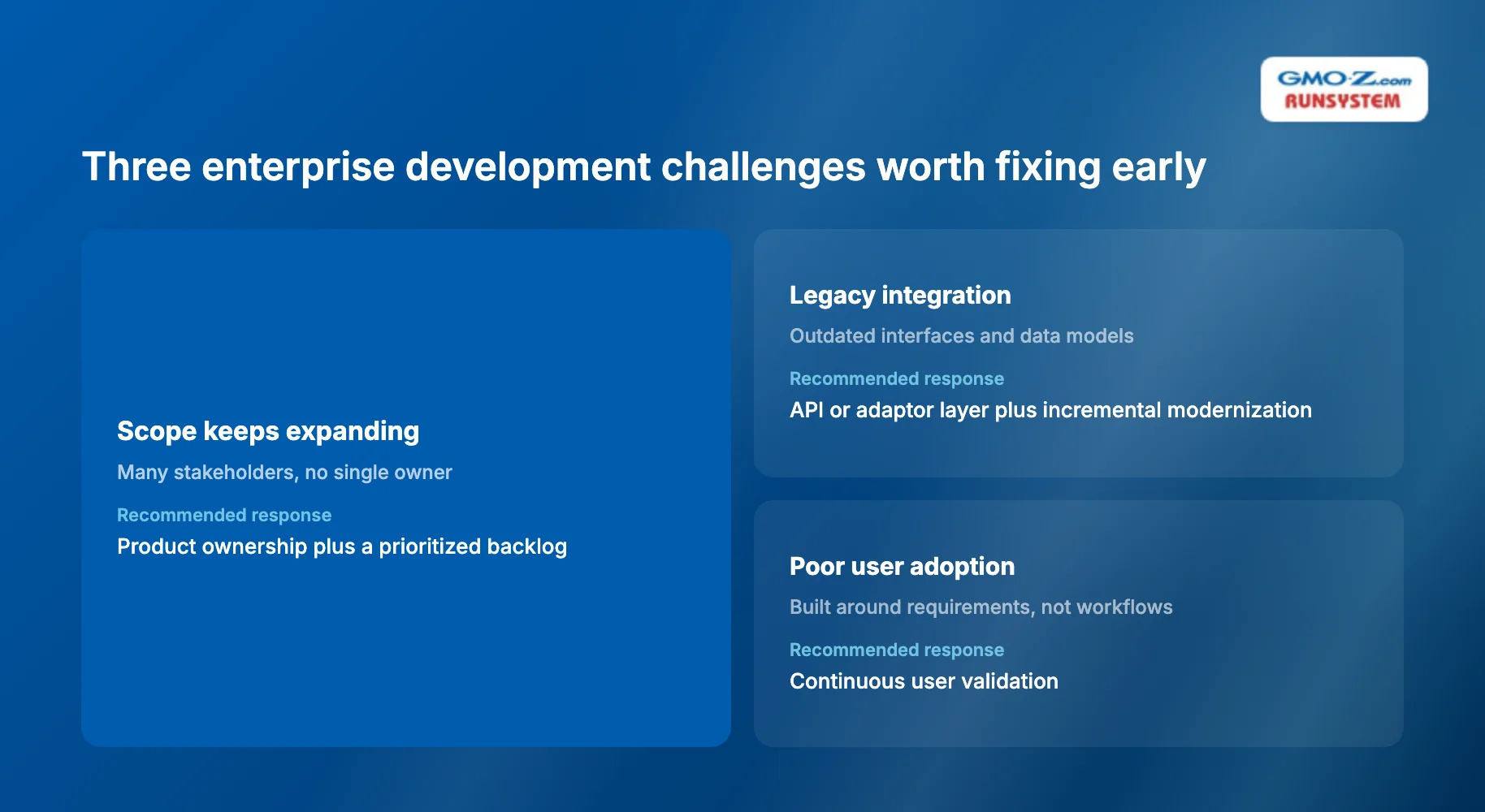
Most enterprise development challenges are predictable. The same root causes keep producing them, across different organizations, different industries, different decades of tooling.
Challenge | Why it happens | Recommended response |
Scope keeps expanding | Many stakeholders, no single owner | Product ownership plus a prioritized backlog |
Legacy integration | Outdated interfaces and data models | API or adaptor layer plus incremental modernization |
Poor user adoption | Built around requirements, not workflows | Continuous user validation |
Data inconsistency | Multiple systems of record | Clear data ownership and governance |
Performance issues | Scale considered too late | Capacity planning plus performance testing |
Security gaps | Security treated as a final phase | DevSecOps and security-by-design |
High maintenance cost | Excessive architectural complexity | Optimize for maintainability |
Release risk | Manual deployment and testing | CI/CD plus automated validation |
Architecture complexity deserves its own callout, since it is often treated as a proxy for quality rather than a cost. A system does not become more enterprise-grade simply because it uses more services or platforms. Every additional moving part adds an integration point that can fail, and that is exactly the dynamic behind the microservices consolidation trend covered earlier.
Back to topAn enterprise application succeeds when it closes the business capability gap it was built to address, not when it ships on schedule. Deployment completion and on-time delivery only measure whether the project finished. Whether it actually worked is a different question, and every metric should tie back to the original business problem, not to the delivery calendar. The table below groups common KPI (key performance indicator) categories by the business goal they serve.
Business goal | Example metric |
Automate processes | Manual steps eliminated |
Improve productivity | Time per transaction or task |
Improve adoption | Active users, task completion rate |
Improve reliability | Availability, incident rate |
Improve releases | Deployment frequency, lead time |
Reduce cost | Cost per process or transaction |
Improve integration | Failed integrations, manual reconciliation |
Improve quality | Defect and rework rate |
Deployment frequency is worth calling out on its own. It is one of the clearer proxies for delivery-process health that exists. DORA's (DevOps Research and Assessment) 2024 State of DevOps report found elite teams deploying 182 times more frequently than low performers, the last year the research used that four-tier comparison before its 2025 methodology shifted to team archetypes. That gap says less about individual developer speed than it does about whether the architecture and release process were built to support frequent, low-risk change in the first place.
A simple evaluation heuristic ties these categories together: enterprise application value equals business outcome, plus user adoption, plus operational reliability, minus ongoing complexity. Treat it as a decision framework for weighing trade-offs, not a financial accounting formula. A system that scores well on business outcome but accumulates high complexity is not a long-term success, even if the initial rollout looked clean.
Back to topEnterprise application development succeeds when the organization designs for more than the features required today: changing business processes, future integrations, growing data, long-term maintainability. Choosing the newest technology is not the closing lesson here. Enterprise-grade software is software the business can trust, operate, integrate and change over time. That standard has nothing to do with how recently a framework was released.
If your team is weighing whether to modernize a legacy system, build a new enterprise application, or bring in outside capacity to do either, one question matters most, the same one from the start of this guide: is this workflow a genuine business capability gap, or a preference for newer technology? Get that answer wrong, and it just adds one more application to the 897 an average large enterprise already juggles.
RunSystem works with enterprise teams on architecture assessment, legacy modernization, custom enterprise software and dedicated development teams (scoped per engagement, contact RunSystem for a quote). Before bringing in outside capacity, ask a more useful question first: can your current systems actually support the growth you are planning for, or is that gap already costing more than a proper assessment would?
Back to topTimelines depend on scope. A typical custom enterprise application takes 6 to 12 months for an initial production release; larger ERP-scale implementations often run 12 to 24 months. Phased delivery can put usable functionality in front of users well before the full scope is complete.
Cost varies too widely by scope, integrations and compliance requirements for a reliable flat figure. Non-functional requirements like security and data governance typically add more to the budget than the visible feature set does, which is why cost gets scoped per engagement.
A typical team includes a product owner, business analyst, solution architect, backend and frontend developers, a QA (quality assurance) engineer, and a DevOps or security specialist. Larger programs also need a dedicated integration engineer once the system connects to several legacy or third-party platforms.
Yes. Incremental modernization, such as adding an API layer or replacing only the most brittle integrations, often reduces risk compared to a full replacement. Modernization makes sense when the existing application still holds business value and the main problem is specific legacy constraints.
It depends on whether the application is core differentiation or a supporting function. Keep systems that are a source of competitive advantage in-house for long-term control. Consider outsourcing when the priority is speed, cost predictability, or bridging a skills gap the internal team does not have.
Back to top