Family site
Family site
Family site



behind them.
Enterprise system | Typical business need | Example capabilities |
ERP | Connect core operations | Finance, procurement, inventory, operations |
CRM | Manage customer relationships | Sales pipeline, customer data, service |
SCM | Coordinate supply chains | Procurement, logistics, inventory |
HRM/HCM | Manage workforce operations | Payroll, recruitment, workforce management |
BI and analytics | Improve decision-making | Dashboards, reporting, forecasting |
Workflow/BPM systems | Automate business processes | Approvals, task routing, process automation |
Custom enterprise platforms | Support unique operational models | Internal portals, industry-specific workflows, multi-system platforms |
Most enterprise software development work isn't a greenfield build. It's one of these instead:
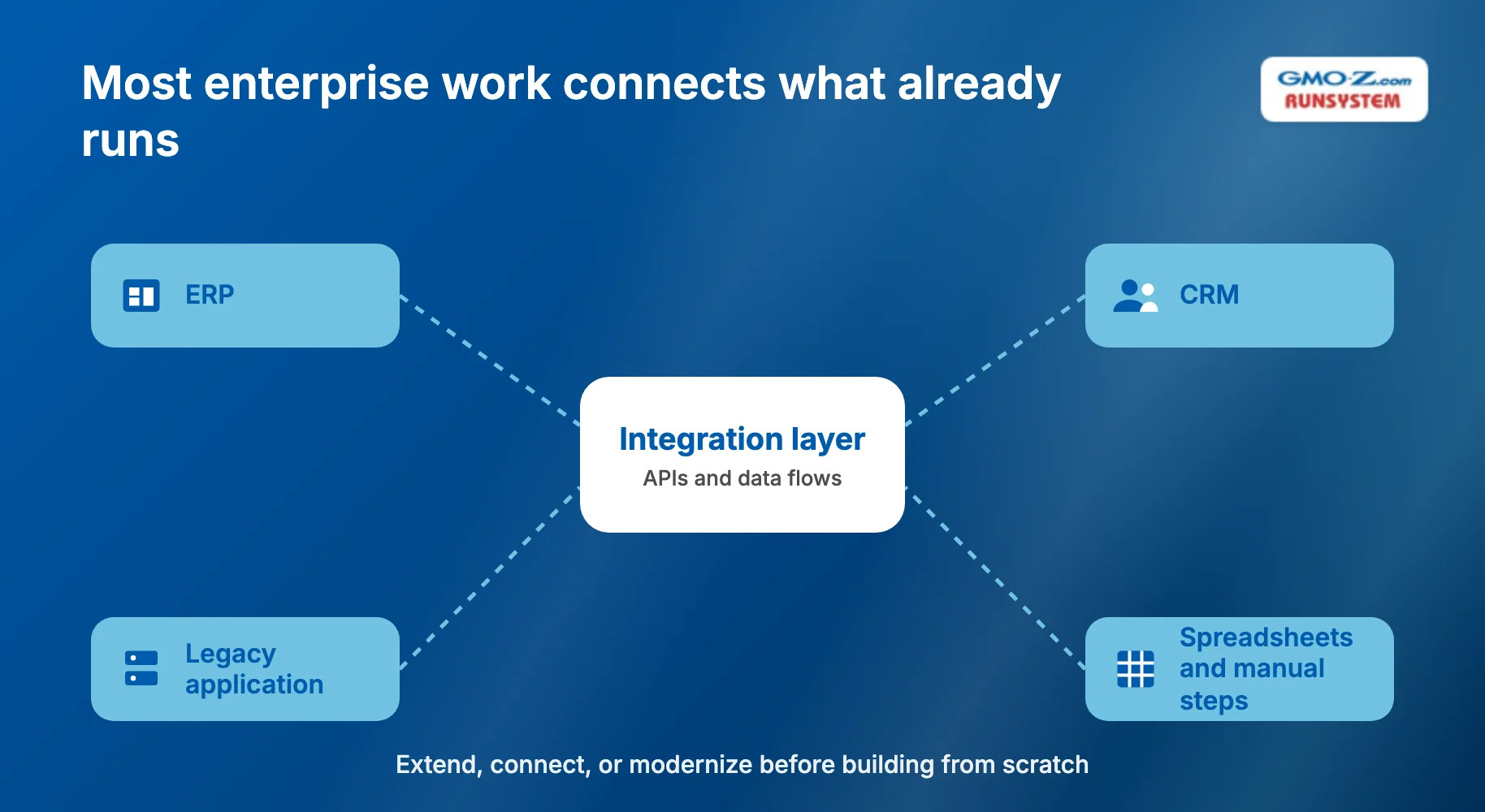
This changes the first question you should ask. Instead of "what should we build," ask "what do we already have, and where does it break?" The answer usually points straight at the build-vs-buy decision.
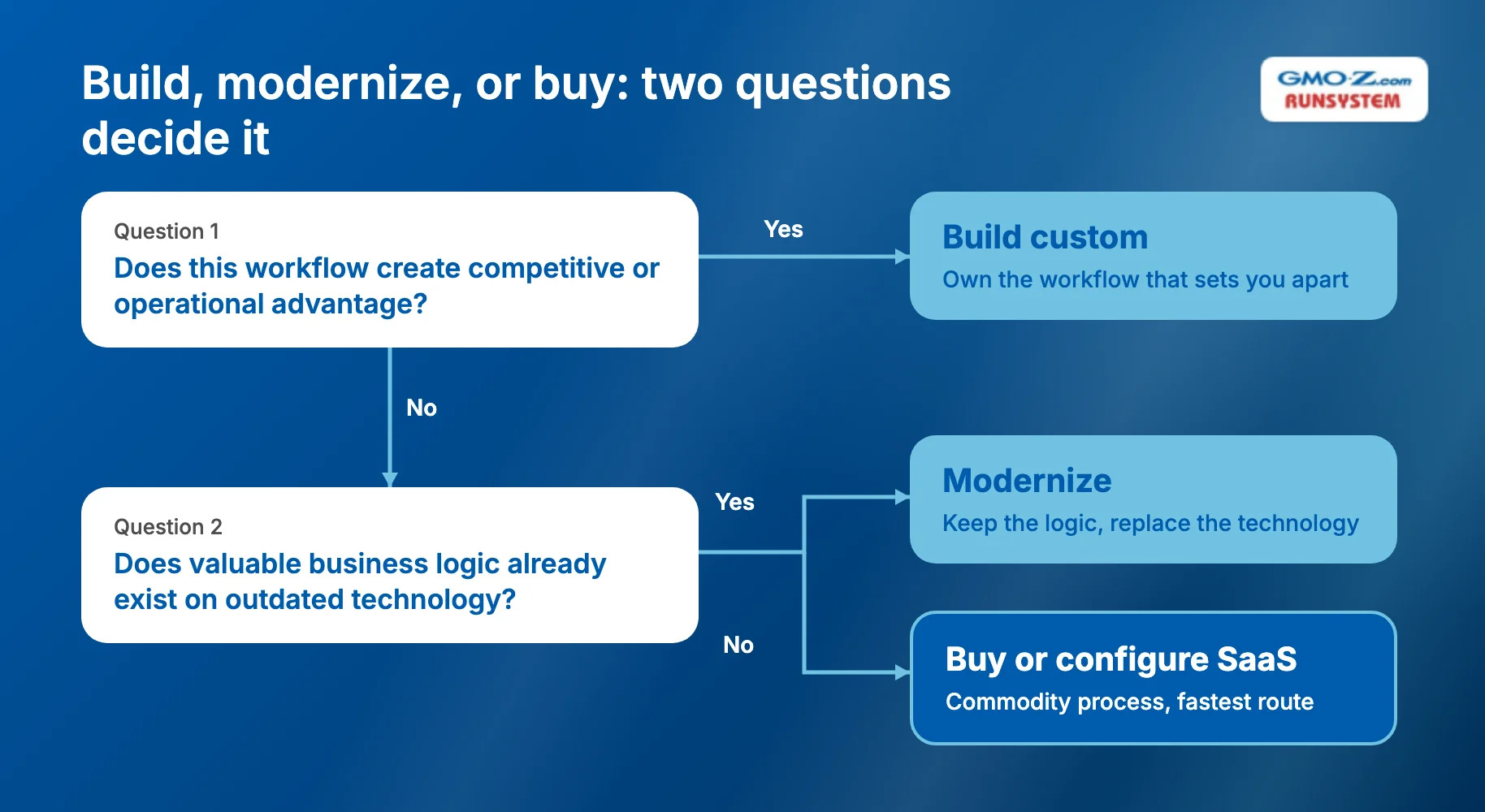
Back to topBuild custom software when the workflow itself creates competitive or operational advantage, and buy or configure existing software for everything else. Most organizations apply that test backward: they default to buying commodity processes at a premium through heavy customization, then build custom software for workflows that were never differentiating in the first place.
A few practical signals suggest a workflow has outgrown standard software:
A sound make-or-buy decision asks one question first: does this capability create a real competitive advantage? If yes, building internally is worth the ownership cost. If speed, cost control, or proven reliability matter more than differentiation, buying or partnering wins. The table below applies that test across four options.
Option | Best suited for | Main advantage | Main trade-off |
Buy/configure SaaS | Standard business processes | Faster deployment | Less flexibility |
Custom build | Unique or differentiating workflows | Maximum control and customization | Greater investment and ownership responsibility |
Modernize existing system | Valuable system with outdated technology | Preserves business logic while removing technical limitations | Migration complexity |
Hybrid approach | Mix of standard and proprietary processes | Balances speed and differentiation | Integration complexity |
Neither side of this table is free of hidden cost. On the buy side, integration, training, and customization work pushes the true total cost of ownership well beyond the subscription price. On the build side, large custom projects carry the overrun risk behind the earlier 45%-over-budget, 56%-less-value numbers. Buying moves risk from delivery into integration rather than removing it. Modernizing sits in between: you keep the business logic that works and replace the technology under it.
So the rule is short. Build what differentiates the business, buy what's commodity, and modernize when the logic is worth keeping but the technology around it has become the constraint.
 Back to top
Discovery has to answer seven questions before development starts: the business problem, the stakeholders and user groups involved, the existing workflow, the current system landscape, integration dependencies, compliance requirements, and the expected business outcome.
Define measurable success criteria here too, while nobody has a stake in the answer yet. Typical targets include shorter processing time, less manual data entry, fewer duplicate systems, better order accuracy, higher uptime, and faster reporting cycles. Put a number on each one before development starts; otherwise "success" turns into an argument at delivery.
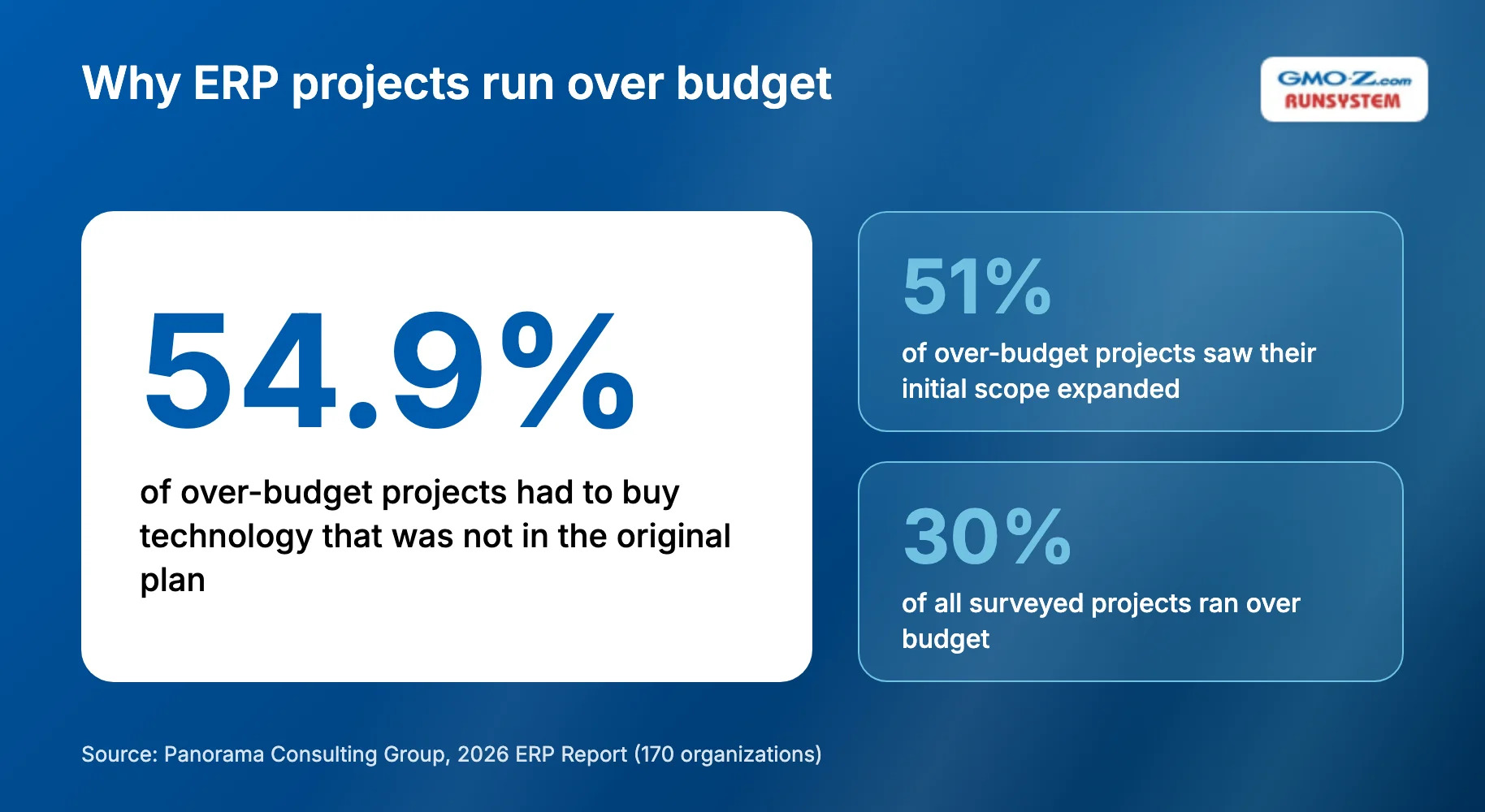
Most projects compress or skip this stage, and that habit explains Panorama Consulting's 2026 ERP Report finding: of the roughly 30% of surveyed ERP projects that ran over budget, the leading cause, at 54.9%, was unplanned technology purchases needed mid-project, ahead of scope creep at 51%, according to Panorama Consulting Group.
Unplanned purchases are a symptom. They show up when someone discovers, mid-project, that the new system doesn't fit the infrastructure around it, which is a gap an architecture audit would have caught. No amount of better code fixes that.
Architecture planning at this stage should define the application architecture, the cloud, on-premises, or hybrid infrastructure, the data architecture, the API and integration strategy, identity and access management, the migration approach, and non-functional requirements. Address the systems that already exist before feature development begins, not after.
This stage covers user workflows, prototypes, agile delivery, incremental releases, and ongoing stakeholder feedback. Phased delivery earns its place for one reason: a workflow mismatch shows up after two weeks, while it's still a design change, instead of after eight months, when it's a rebuild.
Enterprise QA has to cover integration testing, performance and load testing, security testing, data validation, regression testing, user acceptance testing, and failover or recovery testing where the system's criticality warrants it. Skipping integration testing at this stage is how a system that passes every unit test still fails in production, because production is where the systems it depends on actually show up.
This stage covers data migration, the choice between phased rollout and big-bang deployment, user training, documentation, rollback plans, and production monitoring. Adoption belongs inside the implementation plan. When nobody uses a new system, the failure usually happened earlier, at whichever stage left stakeholders out.
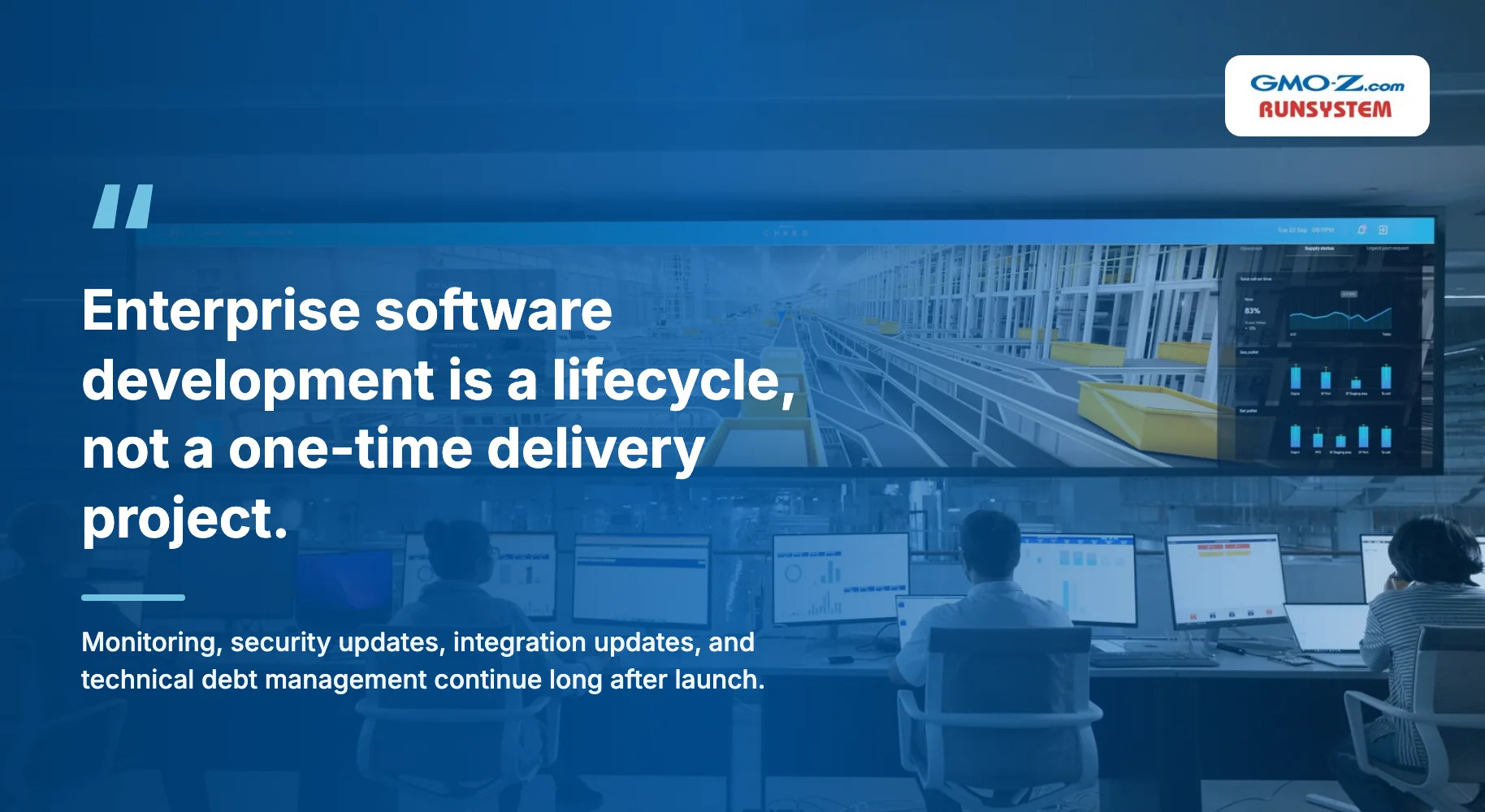
Post-launch work includes monitoring, security updates, performance optimization, infrastructure management, feature evolution, integration updates, and technical debt management. Enterprise software development is a lifecycle, not a one-time delivery project. The cost section below reflects that.
 Back to top
Enterprise-grade software is defined by non-functional requirements, the qualities a feature list doesn't capture but that determine whether the system survives real operating conditions.
The table below summarizes the ten requirements that separate enterprise-grade software from a working prototype, and what each one means in practice.
Requirement | What it means in practice |
Scalability | Handles growth in users, transactions, data, and workloads without redesign |
Reliability | Maintains availability and recovers from failures predictably |
Security | Strong authentication, authorization, encryption, and vulnerability management |
Compliance | Supports audit trails, data policies, and relevant regulations |
Integration | Connects reliably with APIs, legacy systems, SaaS products, and data sources |
Performance | Maintains acceptable response times under real production workloads |
Data integrity | Keeps information accurate and consistent across systems |
Observability | Provides logs, metrics, traces, alerts, and operational visibility |
Maintainability | Lets teams update and extend the platform without excessive risk |
Usability | Supports different user roles without creating unnecessary operational friction |
Microservices, cloud-native infrastructure, and Kubernetes aren't automatically the right answer for an enterprise system, and presenting them as a default is how projects pick up operational complexity they don't need.
A modular monolith is a sound choice for many enterprise applications, particularly where the team is small relative to the system's scope. Microservices help scale complex domains independently, but they add deployment and coordination overhead that a smaller team pays for every release. Cloud infrastructure improves flexibility, but it doesn't automatically solve an architectural problem that was never about infrastructure in the first place. API-first design earns its complexity when many systems need to exchange data; as a default, it's overhead.
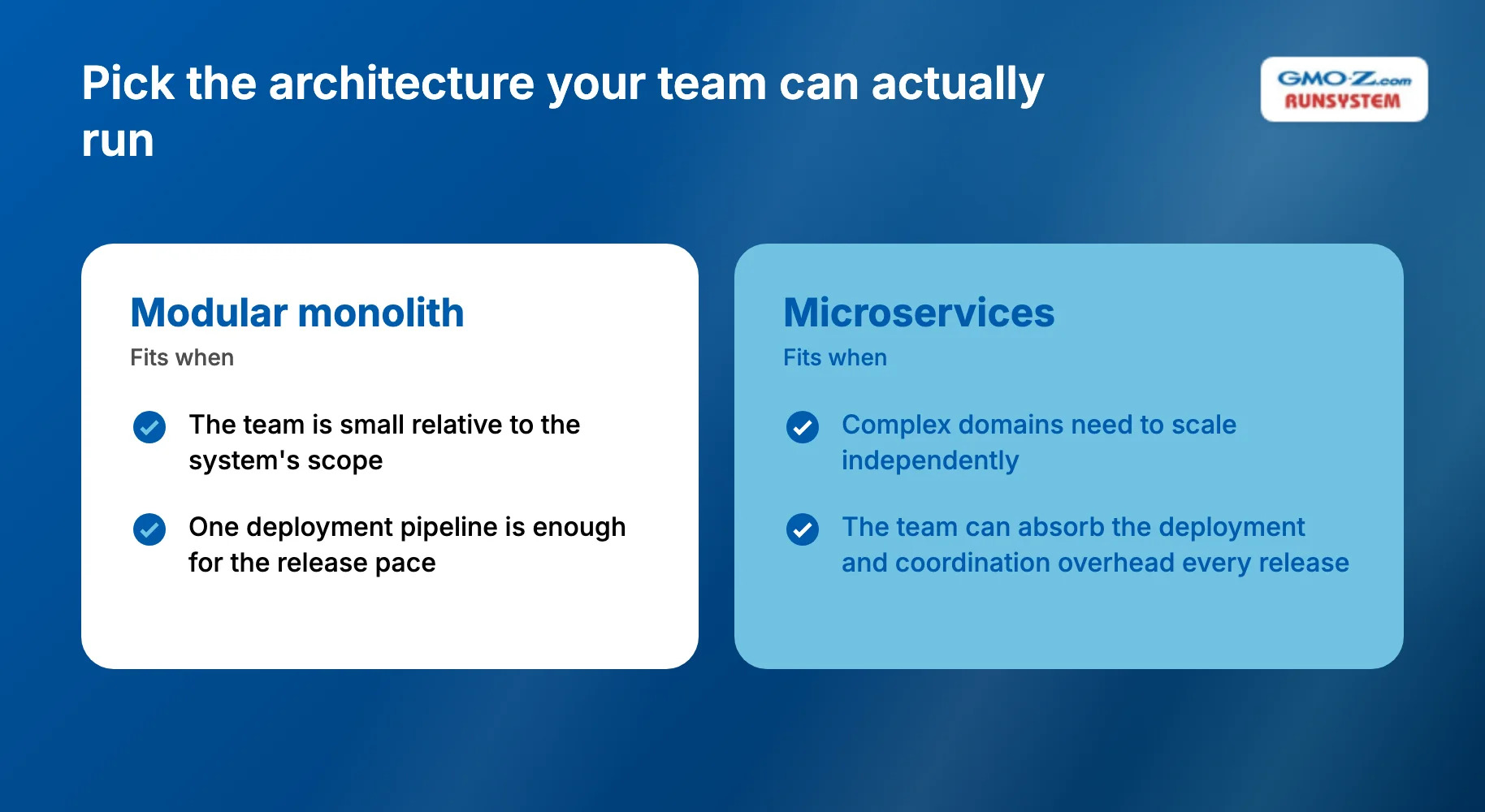
Pick the architecture that fits your business complexity, integration load, reliability needs, and rate of change. Whatever is popular at conferences this year is a poor tiebreaker.
Back to topEnterprise software can't be estimated accurately from feature count alone. The McKinsey and Oxford study cited above found that large IT projects run 45% over budget, and 17% go so badly that they threaten the company's existence. A feature-count estimate can't see the integration and migration risk that often drives that overrun.
The real drivers of enterprise software cost sit outside the feature list:
Without putting dollar figures on it, the drivers combine roughly like this: enterprise development effort equals business scope, plus integration complexity, plus data and migration complexity, plus security and compliance requirements, plus non-functional requirements, plus change-management effort. Each term needs its own estimate. None of them is a multiplier you can apply to a single base number.
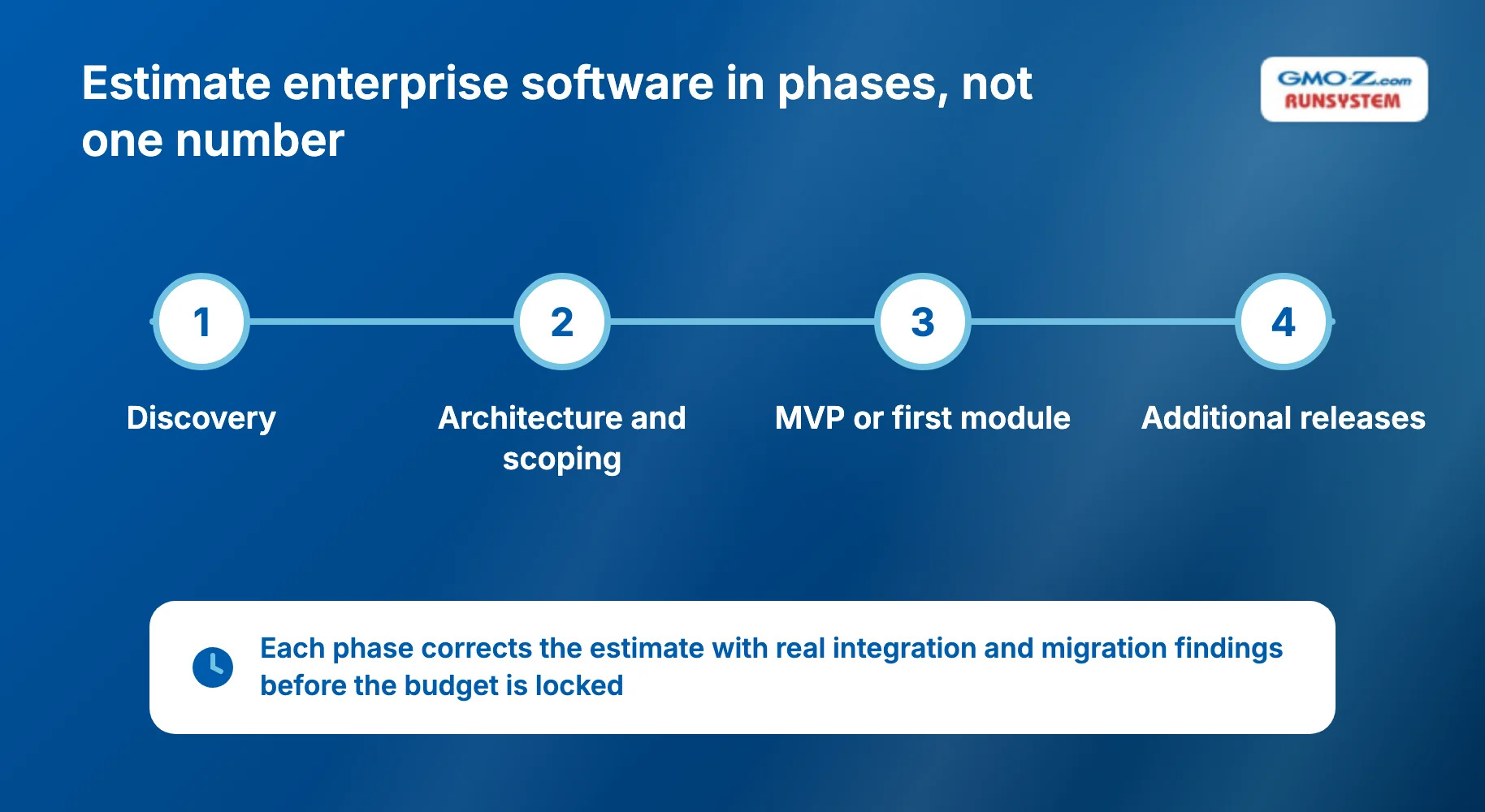
Estimate in phases instead of committing to a single figure upfront: discovery, then architecture and scoping, then an MVP or first module, then additional releases. Phased estimation is more useful than a single "average enterprise software cost," because it lets the actual integration and migration findings from discovery correct the estimate before the budget is locked. That's the kind of late surprise behind the unplanned technology purchases in Panorama's overrun data.
 Back to top
Every risk below traces back to the same root cause the process section already named: skipping or compressing the discovery and architecture stage. The table pairs each risk with why it happens and the specific mitigation that addresses it.
Risk | Why it happens | How to reduce it |
Scope expansion | Many stakeholders add requirements over time | Define priorities and release boundaries during discovery |
Integration failures | Legacy APIs and data formats differ from what was assumed | Audit integrations during discovery, not after development starts |
Data migration problems | Historical data is poor quality or inconsistent | Profile, clean, validate, and migrate incrementally |
Security issues | Security gets considered too late in the process | Build security-by-design and test continuously, not at the end |
Performance problems | Non-functional requirements were never defined | Establish performance targets before development begins |
Low user adoption | Software doesn't match the actual workflow people use | Involve users early and plan change management as its own workstream |
Vendor dependency | Knowledge stays with the external team instead of transferring | Require documentation and a defined knowledge-transfer process |
Big-bang deployment risk | Too many systems change at the same time | Prefer a staged rollout where practical |
Look across all eight, and very few are coding problems. Most come from organizational and integration complexity, and McKinsey's CIO research shows what that costs over time. Technical debt already consumes 20% to 40% of the value of the average enterprise's technology estate, and 10% to 20% of the budget meant for new development gets redirected to managing it instead, according to McKinsey.
That reallocation is the mechanism behind every unmanaged risk in the table above. Leave any one of them unaddressed, and it becomes next year's version of that same diverted budget.
Back to topWriting code to a spec is the minimum. For enterprise work, ask for evidence of enterprise architecture experience, integration and legacy-modernization capability, security and compliance practices, cloud and DevOps expertise, relevant industry or domain understanding, QA and performance engineering discipline, transparent project governance, the ability to work alongside your internal IT team, real documentation and knowledge-transfer practices, and post-launch maintenance capability.
These questions separate a vendor with real delivery discipline from one with a good sales narrative:
A few patterns predict trouble before the contract is signed:
You can put the same questions to GMO-Z.com RUNSYSTEM. Underneath them, most buyers want to know one thing: who is accountable for the integration and migration work, since that is where the McKinsey and Panorama data locate the risk.
RunSystem backs that accountability with CMMI Level 3 process maturity, held since 2012, and ISO/IEC 27001 certification, upgraded to the 2022 revision in 2025, across offices in Hanoi, Ho Chi Minh City, Da Nang, and Hue. RunSystem's enterprise solutions work spans ERP (through its own RUNERP platform or third-party implementation), CRM, and SAP, built around a client's existing operating model rather than sold as a fixed package. Engagement scope and pricing are set per project; contact RunSystem directly for a quote specific to your systems.
Back to topEnterprise copilots, AI agents, intelligent document processing, and workflow automation are moving from pilot projects into production systems. For your project, that means designing governance, validation, permissions, and observability in from the start instead of adding them after an AI feature goes live. Treating AI as plug-and-play is how a copilot ships without an audit trail that compliance later requires.
Organizations increasingly modernize business-critical applications incrementally rather than replacing everything at once, a direct consequence of the tech-debt and integration-risk data covered earlier in this article. If a system's business logic still works, modernizing it is now the usual first answer, with full replacement the exception.
The focus is shifting toward standardized deployment, infrastructure automation, observability, and developer productivity rather than cloud adoption for its own sake. Judge infrastructure options by how mature the operations around them are. A cloud-native label on its own says little.
Enterprises increasingly need systems that can integrate and evolve independently rather than becoming another isolated platform requiring its own separate integration project later. Settle API strategy during architecture planning, before integration needs start surfacing on their own.
Security, access control, auditability, and data governance increasingly shape architecture decisions from the start of a project rather than getting layered in before launch. In practice, security requirements move into discovery and sit next to the other non-functional requirements.
Back to topEnterprise software succeeds when it supports both today's operations and the organizational change still ahead of it. The sequence this article keeps returning to is: identify the business problem, decide whether to buy, build, or modernize, define the non-functional requirements that make software enterprise-grade, deliver incrementally, then measure adoption and business outcomes, not just delivery against a deadline.
Skipping a step doesn't remove its cost. The cost comes back later as the 45% budget overrun, the unplanned technology purchase, or the system nobody adopted.
If you're weighing whether to build, buy, or modernize a system your organization depends on, that's the conversation worth having before any architecture gets proposed. Talk to RunSystem about assessing your current system landscape or about scoping a specific enterprise application, migration, or modernization project.
Back to topNo. SaaS describes a delivery and business model (software hosted and subscribed to), while enterprise software describes software designed to support complex organizational operations. Enterprise software can be delivered as SaaS, built custom, hosted on-premises, or run in the cloud; the two labels answer different questions.
No. Architecture should depend on system complexity, scalability needs, team structure, deployment requirements, and operational capability. A modular monolith is the right choice for many enterprise applications, particularly where the team is smaller than the system's apparent scope would suggest.
Ownership depends on the contract and engagement model, not on a verbal assurance. Organizations should define source-code ownership, IP rights, third-party licenses, documentation, repository access, and handover terms in writing before development starts, not after the relationship ends.
Timeline depends on scope, but the process itself has a fixed shape: discovery, architecture and integration planning, iterative development, testing, and phased deployment. Compressing the architecture and integration stage to save time usually costs more later, since late-discovered misfits are the leading cause of ERP budget overruns in Panorama's 2026 data.
Discovery gaps, not coding problems. Panorama Consulting's 2026 ERP Report found the leading cause of budget overruns was unplanned technology purchases needed mid-project (54.9% of overrun cases), a direct sign that system misfits were discovered too late instead of caught during architecture planning.
Back to top