Family site
Family site
Family site



Legacy application modernization means changing how an aging business application is built or hosted, or replacing it, so your team can change it safely and affordably again.
The application usually still runs the business, but each change costs more than the last. In 2020, McKinsey surveyed 50 CIOs at financial-services and technology companies with revenue above $1 billion. They reported that technical debt, the cost of past shortcuts in code and architecture, absorbs 10 to 20 percent of their technology budget for new products.
There are at least seven ways to modernize, known as the 7 Rs, and the costly mistake is picking one before studying the application. Choose the R (the strategy) for each application from two questions: how much it differentiates your business, and how often it changes. Then buy services against a measurable outcome.
Back to topLegacy application modernization is the work of changing an existing application's code, architecture, or hosting, or replacing it outright. The goal is an application that meets current technical, security, and business needs and keeps the business rules built into it.
A legacy application is software that still matters to daily operations but runs on a stack your team finds hard to change, staff, or support. Age alone does not make an application legacy.
On Microsoft stacks, end of support is often not the forcing event people assume. Microsoft Lifecycle states that .NET Framework 4.5.2 and later "follows the lifecycle policy of the underlying Windows OS on which it is installed" instead of carrying a fixed end date. The Visual Basic 6 (VB6) runtime also follows Windows support, but its development environment (IDE) lost support on April 8, 2008, according to Microsoft Learn.
The more common reasons to modernize are the cost of each change, the shrinking pool of developers who know the stack, and tooling with no supported path forward. Early signs include manual deployments, no automated tests, and code that only two or three people understand.
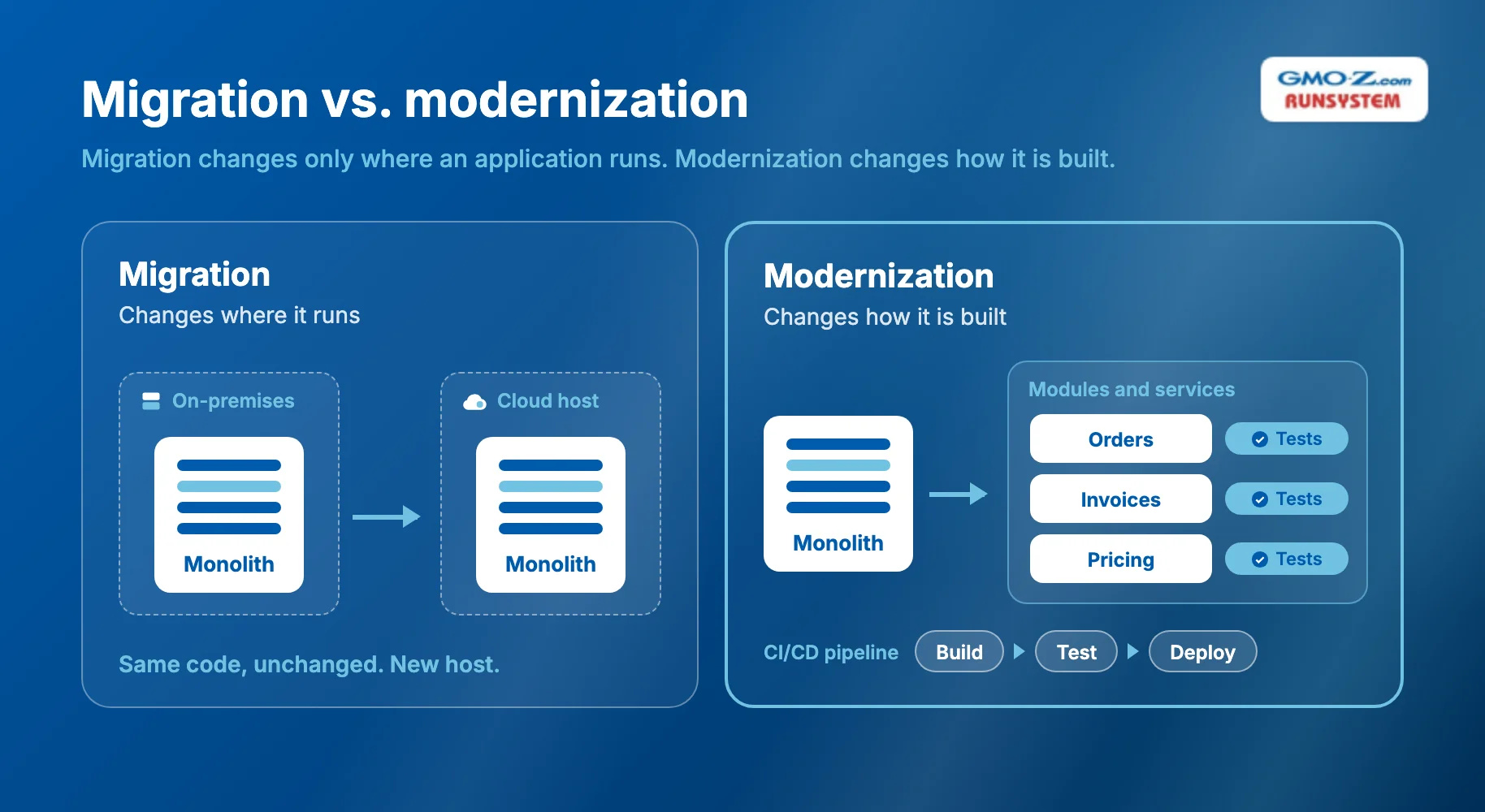
Migration changes only where an application runs, while modernization changes how it is built. Application modernization also stops at one application; legacy system modernization covers the wider estate of infrastructure, data, and the portfolio.
 Back to top
The 7 Rs are the strategies for one legacy application, ordered from least to most change. The names follow Microsoft's Cloud Adoption Framework, which lists eight strategies and keeps refactor separate from rearchitect. Pairing rebuild with replace gives seven.
Gartner's original 2011 model had five Rs, and AWS's 7 Rs add relocate and repurchase while merging refactor with rearchitect. When a provider proposes a "refactor," ask which definition they mean.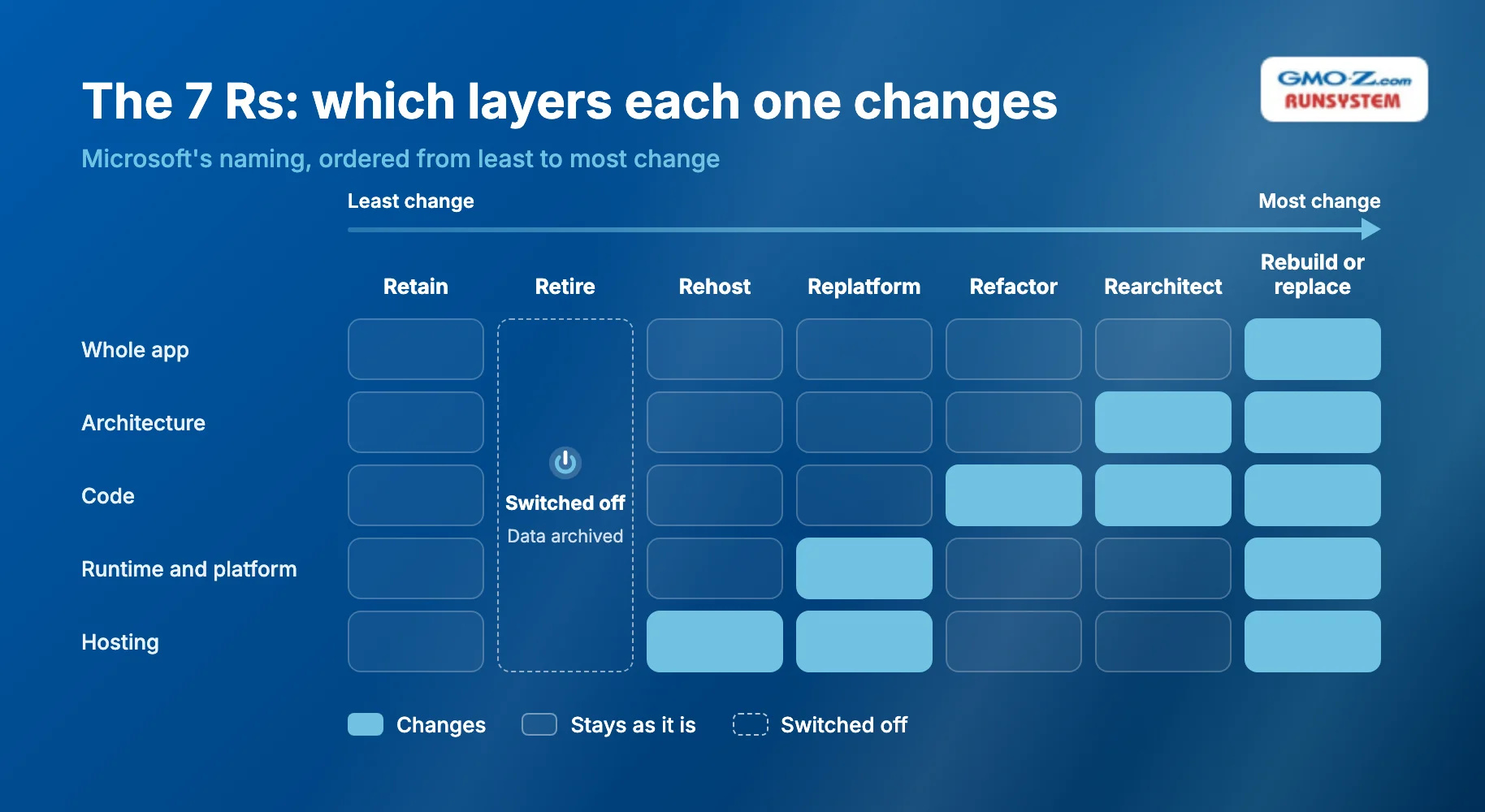
Retain keeps the application on its current stack until a set review date. Microsoft reserves it for stable workloads "with no near-term driver to move." Its fit, cost, and a typical case follow:
Retire switches the application off and archives the data you must keep. AWS flags apps with no inbound connection for 90 days as candidates. The same three points apply:
Rehost moves the application unchanged to new infrastructure, usually cloud virtual machines (VMs). Its narrow fit, cost, and an example follow:
Replatform swaps the platform underneath with minimal code change, such as a newer runtime, containers (packages that bundle an app with its dependencies), or a managed database. Its profile looks like this:
Refactor restructures code without changing its behavior, or in Microsoft's words, "improves the internal structure of code without adding new features." Its fit, precondition, and an example follow:
Rearchitect changes the application's structure, typically from a monolith to microservices (small services deployed independently). Three points sum it up:
Rebuild rewrites the application on a modern stack, while replace buys a SaaS product. The two differ in fit and trade-off:
The decision matrix below maps common situations to the usual R:
Application situation | Recommended R |
Stable, rarely changed, low risk | Retain |
Duplicate or barely used | Retire |
Data center exit deadline | Rehost |
High hosting or license cost, sound code | Replatform |
Hard to maintain, business logic still right | Refactor |
Needs independent scaling and releases | Rearchitect |
Commodity function (HR, CRM) | Replace with SaaS |
Core differentiator, code beyond repair | Rebuild |
A 2×2 of differentiation against change frequency narrows the choice faster:
Rarely changes | Changes often | |
Differentiates the business | Replatform, or refactor when needed | Rearchitect or rebuild (where you should invest) |
Commodity function | Retain or rehost | Replace with SaaS |
Run the retire check first, because an application nobody uses needs no strategy.
Back to topModernizing one application safely takes six steps, and the first three happen before anyone changes production code.
Measure code quality, dependencies, test coverage, real usage, and annual run cost before you choose an R, because each measure rules some Rs in or out. Usage data exposes retire candidates early, and the dependency map shows which modules you can separate without breaking their callers.
Write the outcome down before you pick a technique, for example weekly releases instead of quarterly ones, a lower hosting bill, or an API (application programming interface) for partners. The outcome then picks the R. A team that starts from "we need microservices" risks paying for complexity the outcome never required.
AWS lists "test coverage is very low" among the signals that an app needs refactoring. Yet that same gap is what makes refactoring dangerous. Before you touch the code, build three things:
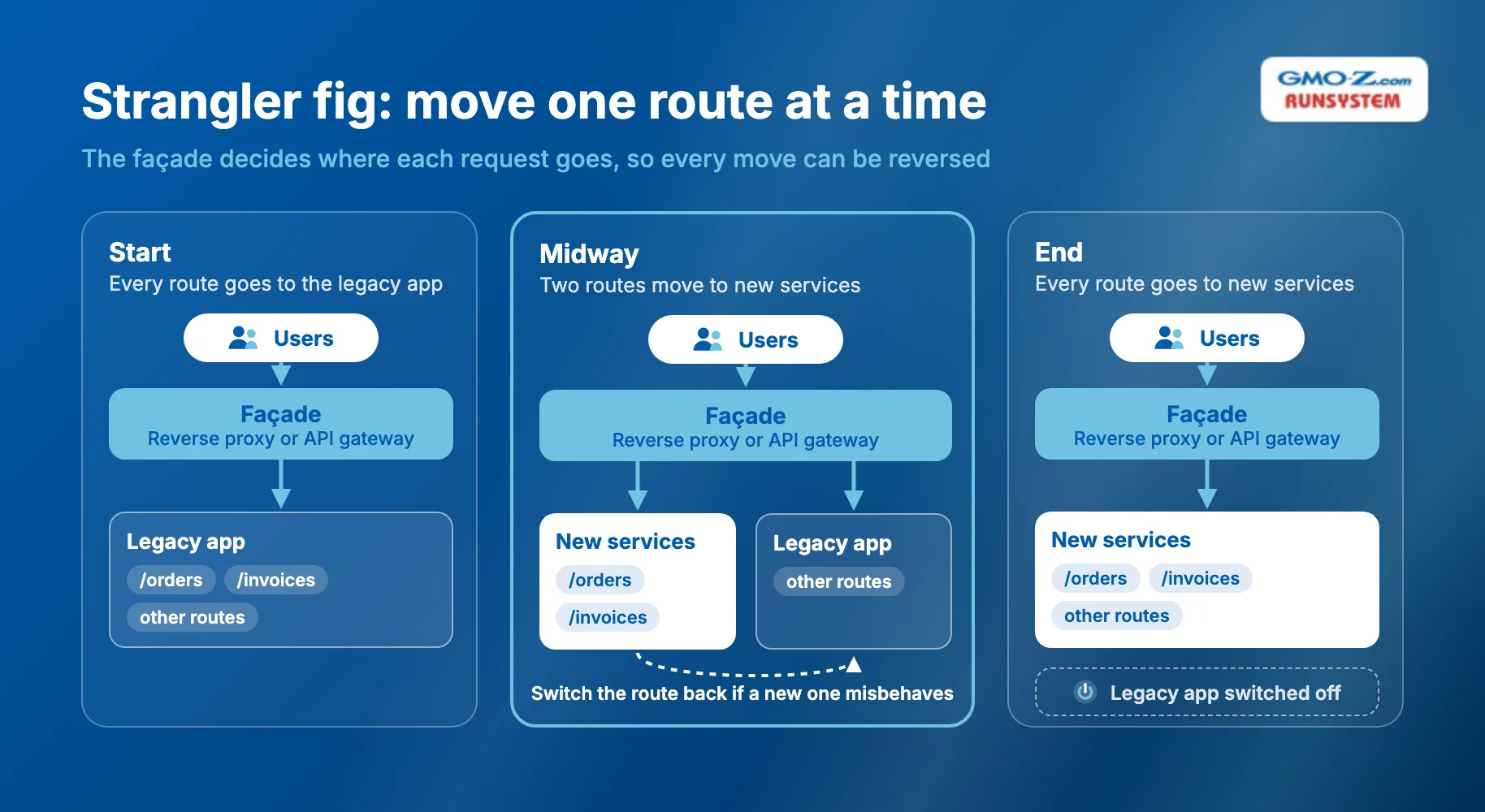
The strangler fig pattern replaces an application piece by piece. According to the Azure Architecture Center, a façade (proxy) intercepts requests to the legacy system and "routes these requests either to the legacy application or to the new services."
In practice, you place a reverse proxy or API gateway in front of the app, so every request passes through one layer. You then move one endpoint (a single URL or operation the app exposes) at a time and switch the route back if the new one misbehaves. Because every request now depends on that layer, keep the façade from becoming a single point of failure.
Copy each module's historical data with ETL (extract, transform, load) and keep both databases in sync with CDC (change data capture). Reconcile record counts and totals before you switch. Rollback stays possible only while the legacy tables and sync processes still exist, so remove them last.
Compare results with your baseline using two metrics from DORA, Google Cloud's DevOps research program: change lead time (from commit to production) and deployment frequency. Add incident counts and run cost. Then shut down the legacy component on a date you set in step 2.
Back to topThe most useful legacy modernization examples are before-and-after patterns that recur across companies on the same stack. Five common ones follow:
Before | After | R used | Typical outcome |
.NET Framework 4.8 monolith on Windows servers | .NET 10 in Linux containers | Replatform + refactor | Cross-platform hosting, faster deploys |
Java EE app on an on-premises app server | Spring Boot 4.x services on Kubernetes | Rearchitect | Independent scaling and releases |
Oracle Forms back office | Web app + REST APIs (standard web interfaces) | Rebuild | Browser access, easier hiring |
On-premises CRM with heavy customization | SaaS CRM + integrations | Replace | Lower maintenance |
Batch file exports between systems | API layer over the legacy core | Rearchitect (API wrapping as a first strangler fig step) | Real-time data for new channels |
Each row carries a detail that changes the plan:
Legacy application modernization services cover assessment, code work, platform and data migration, testing, integration, and support. Read any proposal by asking what you will receive from each line item:
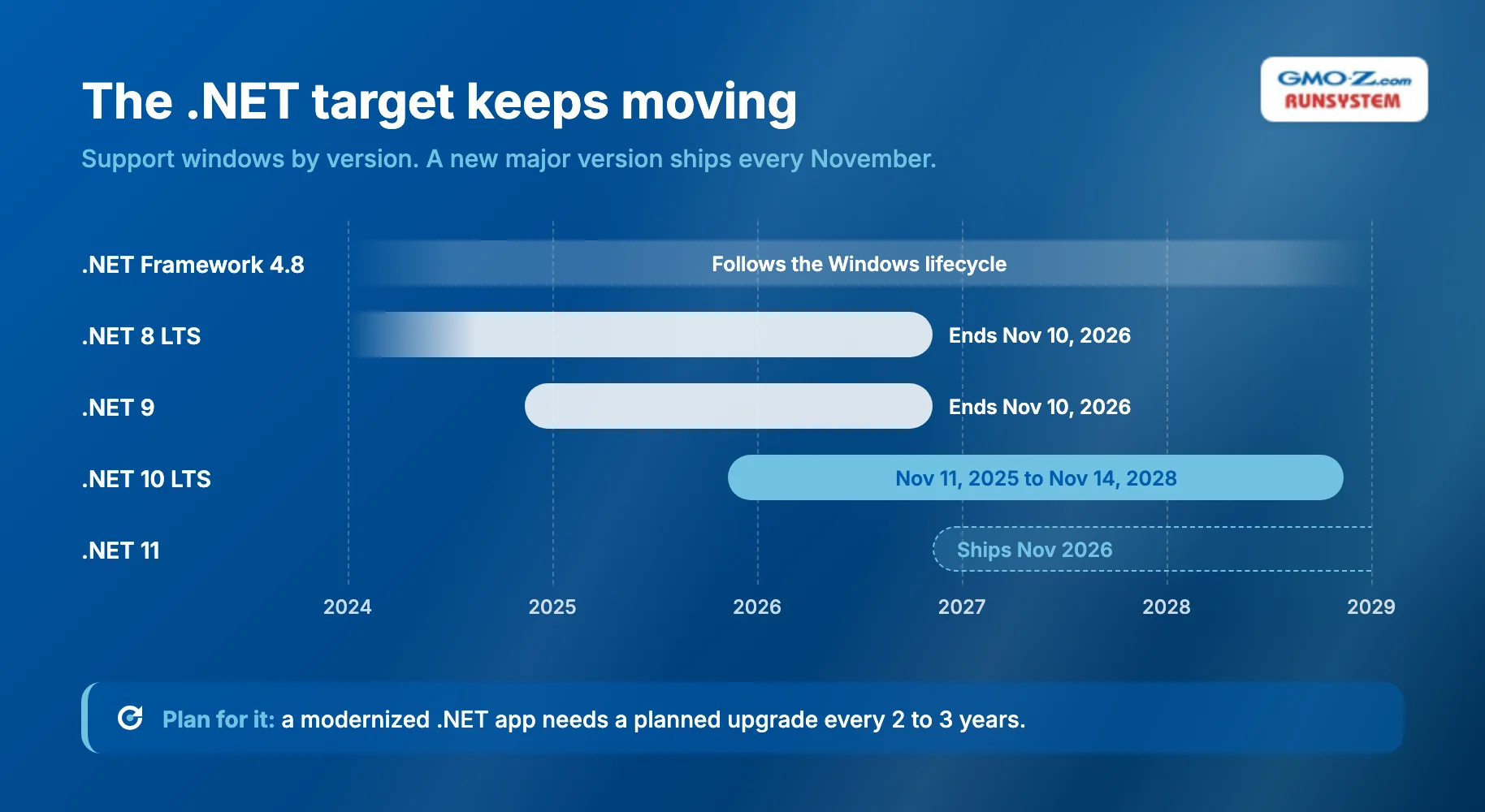
That last item matters more than most proposals admit. Modern .NET ships a new major version every November, and LTS releases get three years of free support. A modernized .NET app therefore needs a planned upgrade every two to three years, which is new work for a team used to a stack that never moved.
Testing and post-go-live support are also the easiest line items to cut, because neither shows up in a demo. Yet they decide whether a replatformed app behaves like the old one, and who answers the call when it does not.
The GMO-Z.com RUNSYSTEM System Migration service keeps both line items in scope for applications on Java, .NET, or PHP moving to AWS, Azure, or Google Cloud. Testing is its own phase before deployment, and 24/7 support continues after migration.
Back to topThe R you choose drives cost and timeline more than any other factor, so price the R before you compare vendors. Of the Rs that move an application, rehost is usually the cheapest and fastest because code does not change, and rebuild the most expensive and slowest. Microsoft adds that modernizing during a migration "introduces complexity and risk to migration timelines."
Within any R, six drivers move the estimate:
The cost most estimates miss is running old and new side by side. Fowler argues that this temporary coexistence code is worth paying for, because "the reduced risk and earlier value from the gradual approach outweigh its costs."
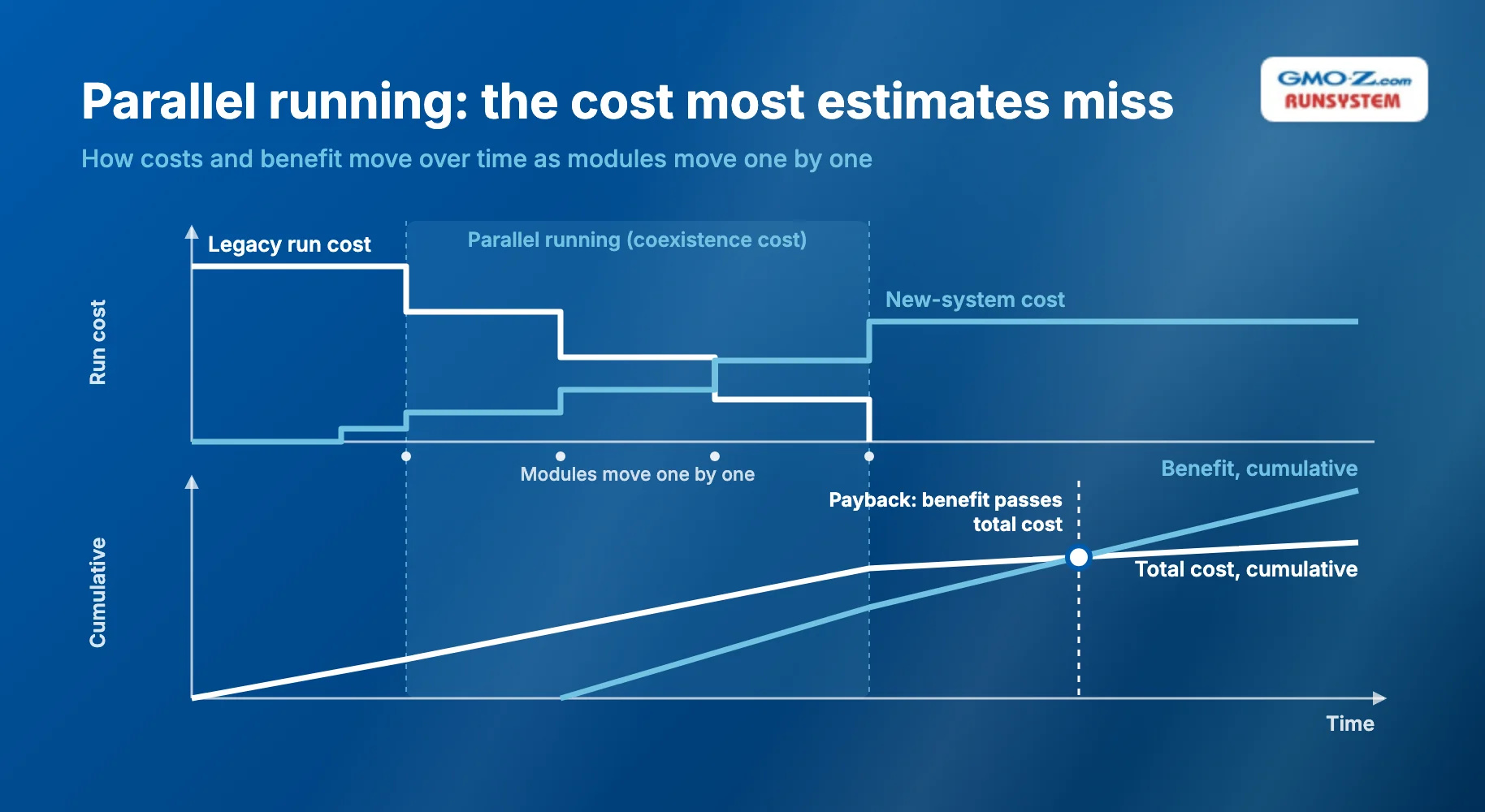
To judge whether the chosen R pays back, use two formulas:
Annual benefit = Run cost saved + Developer time freed + Revenue from faster releases + Risk cost avoided Payback period (years) = Total modernization cost (including parallel running) ÷ Annual benefit
Then read the result against the application's remaining life. If the total cost equals twice the annual benefit, payback takes two years, which suits an application you expect to run for a decade. The same R fails for an application you plan to replace next year.
If an R's payback runs longer than the application's expected life, choose a lighter R.
Timeline follows the same logic. A rehost moves at the speed of infrastructure work, while a refactor or rearchitect moves module by module, as fast as your safety net allows. For large migrations, AWS recommends modernizing applications after the migration is complete "whenever possible," which turns one risky project into two smaller ones.
Back to topFour modernization-specific checks separate a modernization provider from a relabeled migration provider.
A provider should choose the R per application only after reading your code. Ask which applications they would retain or retire, and for a before-and-after code sample from your source framework. A fixed price quoted before that reading means the technique came first.
The plan that follows should contain the minimum the US Government Accountability Office (GAO) checks for: milestones, a description of the work, and the disposition of the legacy system. In GAO's 2025 review of critical federal legacy systems, only three of nine documented plans included all three, so ask for the disposition plan.
Under the strangler fig, old and new code coexist until the last module moves, so settle three points first:
The modern stack keeps moving after go-live, so the handover must cover two items:
Because an outside team sees your code and data, settle four contract points:
Pairing matters most because people slow cloud-native (container-based) adoption more than tooling does. In its 2025 survey, the Cloud Native Computing Foundation (CNCF) found "Cultural changes with the development team" to be the top challenge, at 47% of respondents.
Offshore delivery (by a team abroad) raises the stakes because your code and data leave your building. GMO-Z.com RUNSYSTEM, a Vietnam-headquartered IT partner founded in 2005, offers ISO/IEC 27001:2022 information security certification, upgraded in 2025, as evidence for the data-access check. Its CMMI Level 3 rating, held since 2012, attests to the defined, repeatable process each module's move needs.
Ask it, like any provider, to show how those controls apply to your repositories.
Back to topNo R is best in general. Retain suits a stable tool, and rebuild suits a differentiating app whose code is beyond repair.
The old runtime often does not force your hand, so let the cost of change and the outcome you need drive the decision. The modern target keeps moving too, because .NET 10 support ends on November 14, 2028. Budget now for the upgrades that follow.
Buy services by outcome as well. Ask a provider to commit to measurable results, such as change lead time, deployment frequency, incident counts, or run cost. A promise of "microservices" or "cloud-native" describes only the means, and you are paying for the result.
Start with three steps:
The 7 Rs are retain, retire, rehost, replatform, refactor, rearchitect, and rebuild or replace. They range from changing nothing to starting over. This list follows Microsoft's naming, while AWS's 7 Rs include relocate and repurchase instead and merge refactor with rearchitect.
A common example is a .NET Framework 4.8 monolith moved to .NET 10 in Linux containers, which combines replatforming and refactoring. Another is an Oracle Forms back office rebuilt as a web app with REST APIs, so users work in a browser.
The timeline depends mostly on the R. A rehost can take weeks to months because the code does not change, while a refactor or rearchitect usually takes many months. Code size, data volume, and the number of integrations decide where in that span you land.
Refactor when the business logic is still right and the code can be saved. Rebuild when the application differentiates your business, changes often, and its code is beyond repair. If it rarely changes, a refactor or replatform usually returns more for the money.
Back to top