Family site
Family site
Family site


Software development is the process of planning, designing, building, testing, releasing and maintaining software. Most guides on the topic are written for people learning to code. This one is for people who will pay for software, approve what it should do, or live with the results.
That changes what matters. Coding is the part everyone can see, but it sits in the middle. The work before it decides what gets built. The work after it decides whether the system keeps working. When a project goes wrong, the cause is usually in one of those two places.
The amount of money involved keeps growing. In its July 2026 IT spending forecast, Gartner puts worldwide software spending at $1,468 billion in 2026, up 15.5% from 2025.
By the end of this guide, you'll know the six stages of the process and what each one should produce. You'll also know the three main ways teams organize the work, who does what on a team, where AI helps today, and which numbers show whether a team is delivering.
Back to topSoftware development is all the work that takes software from a business need to a system people use and keep using for years. It starts before the first line of code and continues long after release.
The difference matters when you read a proposal. A team that only programs will ask for a feature list and start coding. A team that does software development will also ask how the software will be tested, released and kept running. People often mix up three terms. Programming is the act of writing code. Software development is the whole life of the software, from the first requirement to the last update.
Software engineering is the practice of applying engineering methods, such as measurement, standards and review, to that work. The international standard for this area, ISO/IEC/IEEE 12207, sets out a common framework for software life cycle processes, covering development, operation, maintenance and the eventual retirement of software.
Software also comes in two broad forms, custom and off-the-shelf. Custom software is built for one organization and the way it works. Off-the-shelf software is built once and sold to many buyers. The trade-offs between the two, including cost, are covered in a separate guide to custom software development.
Software as a Service (SaaS) is a way of delivering software over the internet. It is not the opposite of custom software. Many custom systems are delivered as SaaS.
So when someone quotes you for "development," ask which of the six stages below the quote covers. Requirements and maintenance are the two most often left out.
That definition covers very different kinds of software, so it helps to sort them before looking at how they're built.
Back to topTypes of software development sort along two lines. One is what gets built. The other is which layer of the system the team works on. Lists online look inconsistent because they mix the two.
By what gets built, software falls into four kinds:
Business software reaches users in one of two ways. It runs in a browser as a web application, or on a phone as a mobile app. Most business projects are application software built through web application development, mobile app development, or both.
If a vendor proposal describes something outside those two, ask why the project needs it.
By layer, the work splits into front-end, back-end and full-stack development. Front-end is what users see and touch, such as screens and forms. Back-end is what they never see, such as business rules, data and links to other systems. Full-stack developers work across both.
Two specialisms cut across these layers. Mobile development builds apps for iOS and Android. Cloud-native development builds services made to run on cloud platforms, usually packaged in containers with tools such as Docker and Kubernetes.
Low-code platforms let people build software with visual editors and little code. They suit simple internal tools more than complex customer systems.
When you size a team, ask how the back-end and the links to other systems are staffed. Users never see that work, so it's easy to leave out.
Whatever the type and layer, the work moves through the same stages.
Back to topThe software development process moves through six stages, from requirements to maintenance. Published versions of the software development life cycle (SDLC) list anywhere from five to nine stages under different names. The international standard for software life cycle processes doesn't fix a number. This guide uses the same six labels throughout.
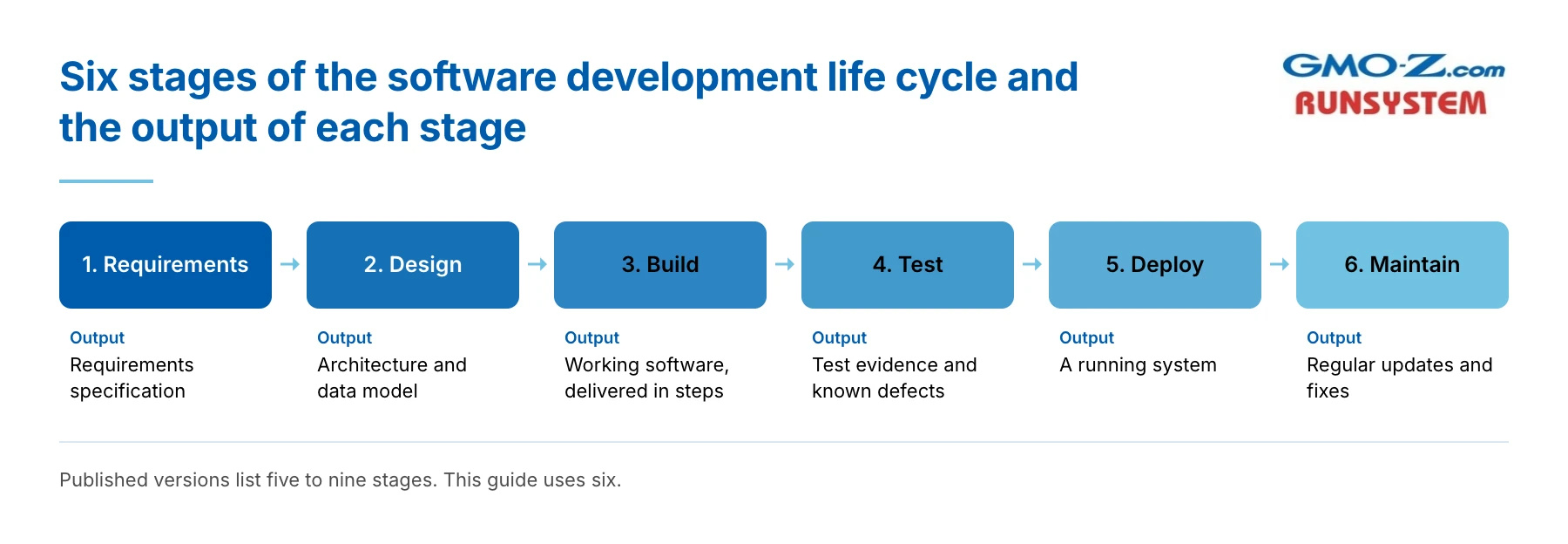
Requirements turns a business need into a written list of what the software must do. It covers who will use it, what they need to get done, what data goes in and out, and which other systems it must connect to. The output is a requirements specification the team can be held to.
Problems start when links to other systems or unusual cases are missed. They turn up during Build, when adding them is slow and expensive. Before approving this stage, ask for a list of every system the software must connect to.
Design decides how the software will be built. The team sets the overall structure, called the architecture, and the data model. It also plans the links to other systems and the screens. The output is an architecture and data model, often with screen designs or a clickable prototype.
A common problem is a design built for launch day that is hard to change later. Technical debt often starts here, and the measurement section below explains what it costs. Ask how the design will cope if a requirement changes six months after launch.
Build is where developers write the code. Another developer reviews each change, and every change is stored in a version control system such as Git, which keeps a full history. The output is working pieces of software, delivered in steps.
Build is the longest stage and the one buyers watch most closely. Problems that started in Requirements or Design tend to show up here, and the developers get the blame for them. Ask to see a working piece of the software instead of a percent-complete figure.
Testing checks that the software does what the requirements say. Teams test single pieces of code, then how pieces work together, then the whole system. Users then run acceptance tests on real tasks. Regression tests run again after every change to catch anything the change broke, and modern teams run many of them automatically.
The output is test evidence. That means what was tested, what passed and what is known to be broken. So ask for the list of known defects at release, since "all tests passed" tells you very little.
Deploy is the release of the software to real users. The team sets up servers or cloud services, moves data from old systems, and switches users over. The output is a running system.
Data migration is the step people most often underestimate. Old data is messier than anyone expects, and moving it takes longer. Releasing everything at once also raises the risk, because a failure hits every user. Teams that use CI/CD (continuous integration and continuous delivery) release in smaller steps. Ask how the release can be rolled back if it fails.
Maintenance keeps the software working after release, for as long as anyone uses it. It covers bug fixes, security patches, updates to the platforms the software depends on, and small changes users ask for. The output is regular updates and fixes.
The common mistake is leaving maintenance out of the budget because the project has "ended." The software is still running. Before you approve a build, agree who will handle software maintenance and how it will be paid for.
The stages say what gets done. A method decides the order and the rhythm.
Back to topSoftware development methodologies set the order and rhythm in which a team works through the six stages. Many exist, but three cover almost every business project. They are Waterfall, Agile and DevOps.
The waterfall model runs the six stages once, in order. Each stage must finish before the next one starts. The team writes a lot of documents, and the scope is fixed at the start.
Waterfall works well when the requirements are clear and won't change. It also fits regulated work, where each stage needs formal sign-off before the next can begin. The weakness shows when something changes late, because going back to an earlier stage is slow and costly.
Choose Waterfall only if you can write the requirements down today and expect them to hold.
Agile software development delivers working software in short cycles and adjusts the plan between them. Its values come from the Manifesto for Agile Software Development, published in 2001.
Scrum and Kanban are the two frameworks teams usually mean. Scrum works in sprints of one month or less, with three accountabilities held by the Product Owner, the Scrum Master and the Developers, as set out in the 2020 Scrum Guide. Kanban has no sprints and limits how much work is in progress.
Someone on your side must answer questions and accept work every sprint. If nobody can give a few hours every two weeks, Agile will stall. Plan it before signing.
DevOps is a way of working that joins the people who build software with the people who run it. It sits on top of Waterfall or Agile once software is live, so it doesn't replace either.
Its core is automation. Every code change is merged and tested as soon as it is made. And changes that pass their tests move to production automatically. DevSecOps adds security checks to the same pipeline.
Ask a vendor how long a one-line change takes to reach users. The answer shows whether DevOps is actually practiced or only claimed.
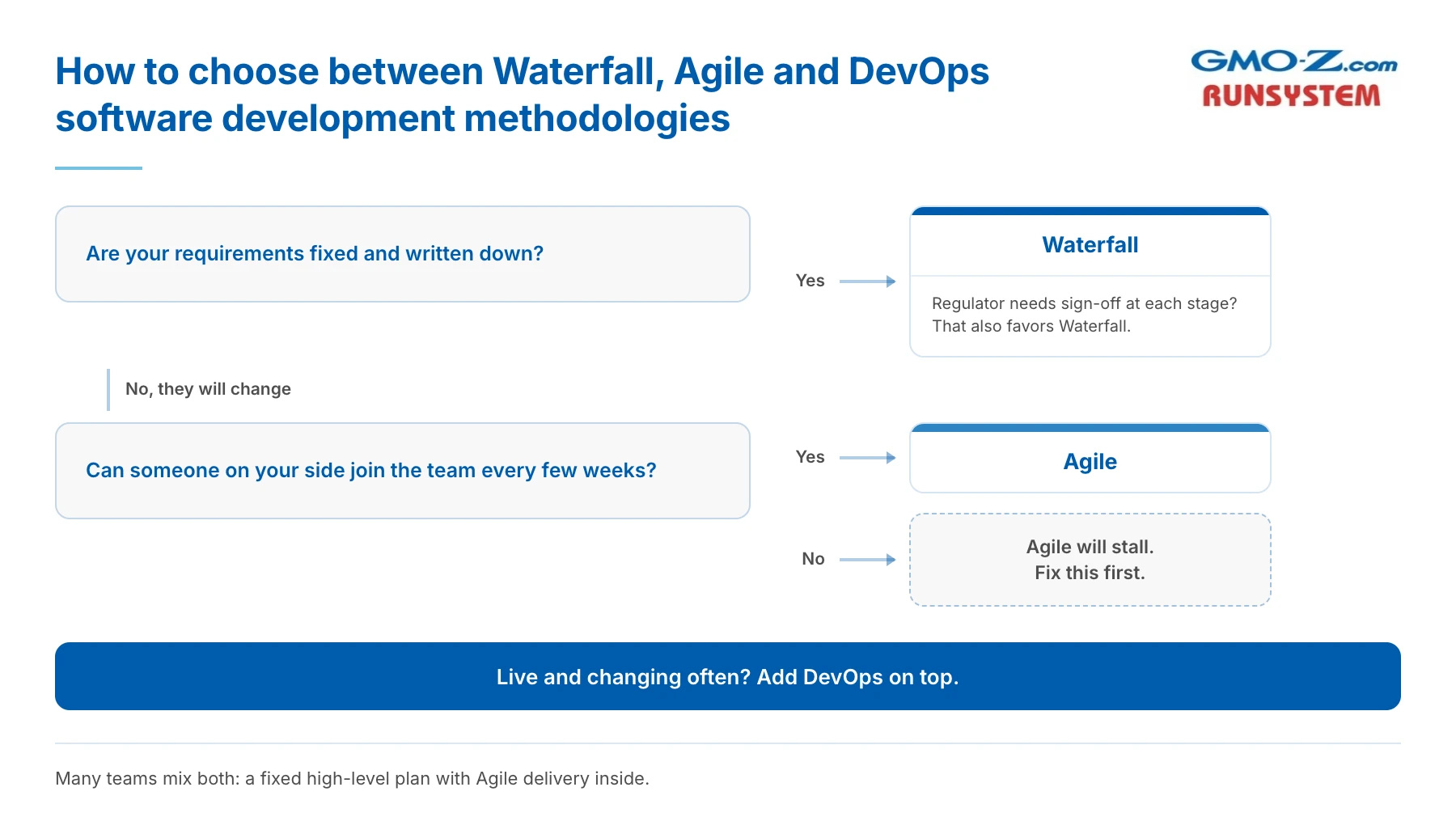
Choose the method by how stable your requirements are. If they are fixed and written down, Waterfall can work. If they will change, and most do, Agile fits better. Once the software is live and changing often, add DevOps.
Two more questions can tip the choice. Does a regulator need sign-off at each stage? That favors Waterfall. Can someone on your side join the team every few weeks? Agile depends on it. Many teams mix the two, with a fixed high-level plan and Agile delivery inside it.
Before you pick, write down which requirements you're sure of today. If the list is shorter than you expected, don't buy a fixed-scope Waterfall project.
A method works through people, and a team needs more of them than "developer" suggests.
Back to top
Software development is done by a team, and most of its roles exist to handle the stages around the code.
Role | Main stage | What they do |
Business analyst | Requirements | Turns business needs into written requirements |
Product owner | All stages | Sets priorities and accepts finished work |
Architect or tech lead | Design | Sets the structure the code will follow |
Developers (front-end, back-end, mobile) | Build | Write and review the code |
QA engineers and testers | Test | Check the software and report defects |
DevOps engineer | Deploy, Maintain | Runs releases, servers and monitoring |
Project manager or Scrum Master | All stages | Keeps the work moving and on schedule |
Only one row in that table belongs to Build alone. On a small project, one person may hold two roles, such as analyst and product owner. The work in each row still has to be done by someone.
The workforce behind these roles is large. The U.S. Bureau of Labor Statistics counted 1,905,400 jobs for software developers, QA analysts and testers in 2025, of which 1,717,800 were software developer jobs. It projects the combined group to grow 10% from 2025 to 2035, against 3% for all occupations.
If you need to add people to an existing team, you can bring in dedicated offshore developers
When you read a proposal, check that Requirements and Tests have named people behind them. If they're folded into "developers," ask who actually does that work.
Each of these roles works through tools, and the tools line up with the same six stages.
Back to topSoftware development tools make most sense grouped by the stage they serve, and most of them serve Build, Test and Deploy.
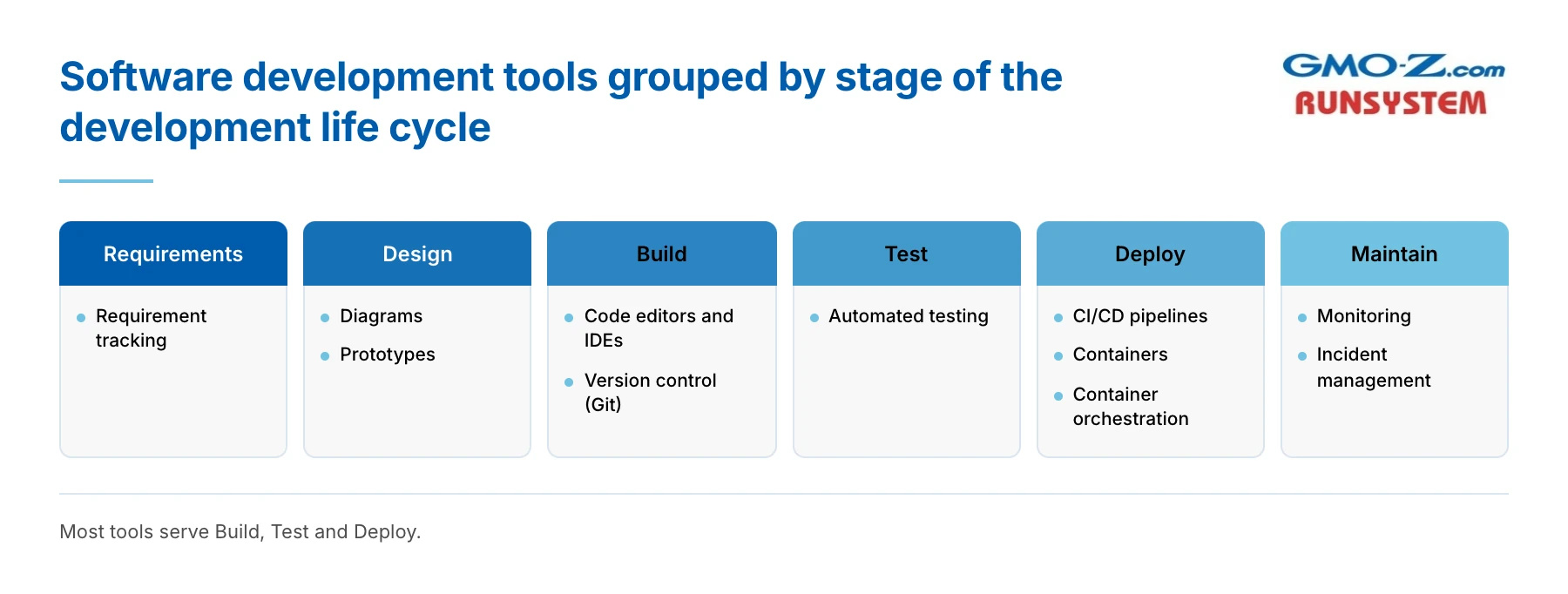
In Requirements, teams use tracking tools to record and rank what needs to be built. Design uses diagrams and prototype tools so people can review the plan before code exists. Build runs on code editors and integrated development environments (IDEs), plus version control such as Git. Test uses automated testing tools that rerun checks on every change.
Deploy depends on CI/CD pipelines, containers and tools that manage containers at scale. Maintain uses monitoring and incident tools that warn the team when something breaks.
Ask a team which tool records a new requirement, and who decides whether it gets built. Most teams can name the tool at once. The second answer, a named person who can say no, tells you far more about how Requirements is run.
Requirements and Maintain have the fewest specialist tools, because both depend mostly on people and process. So judge a team by how it handles those two stages, not by the length of its tool list.
The newest tool in the chain is AI, and it's where expectations run furthest ahead of the evidence.
Back to top
AI is now a normal part of writing and testing code, but most developers don't plan to use it for project planning or for running live systems.
In Stack Overflow's 2025 Developer Survey, 84% of respondents said they used AI tools in their development work or planned to. Among professional developers, 51% used them every day.
Trust has not kept up. More developers distrusted the accuracy of AI output (46%) than trusted it (33%). The most common complaint, named by 66%, was AI answers that are "almost right, but not quite." For a buyer, that means AI-written code still needs the same review and testing as any other code.
AI agents, which carry out multi-step tasks on their own, are less common. In the same survey, 37.9% of respondents said they had no plans to use them.
The same survey shows where AI is and isn't used. For writing code, 16.9% of respondents said they already did the task mostly with AI, and 59% said partly with AI. For project planning, 69.2% said they had no plans to use AI. For deployment and monitoring, that share was 75.8%.
Set against the six stages, that pattern puts AI mostly in Build and Test. It is light in Requirements, Deploy and Maintain.
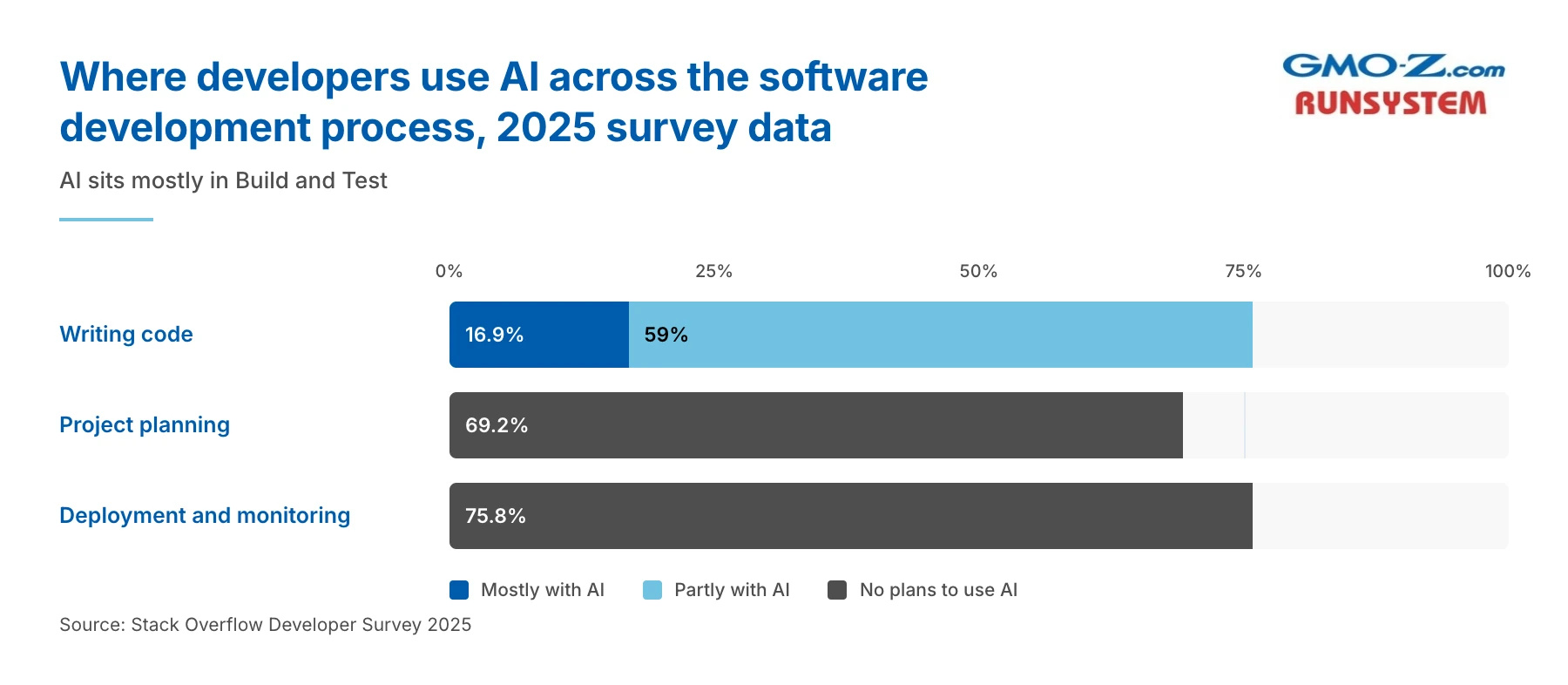
AI writes code faster. It does not yet decide what the code should do.
If a quote comes in lower "because of AI," ask which stages the saving comes from. If the answer is only Build, the cost of requirements and maintenance hasn't moved.
AI can change how fast code gets written. You still need a way to see whether the software works.
Back to top
You measure software development by what reaches users and how well it holds up. A percent-complete report measures effort. The two measures below show results.
DORA, a long-running research program run by Google Cloud, uses five software delivery metrics. Three measure throughput, meaning speed:
Two measure instability, meaning how often releases go wrong:
DORA's research finds that speed and stability are not trade-offs. Teams strong on one metric tend to be strong on all five. The one-line-change question in the DevOps section asks for change lead time.
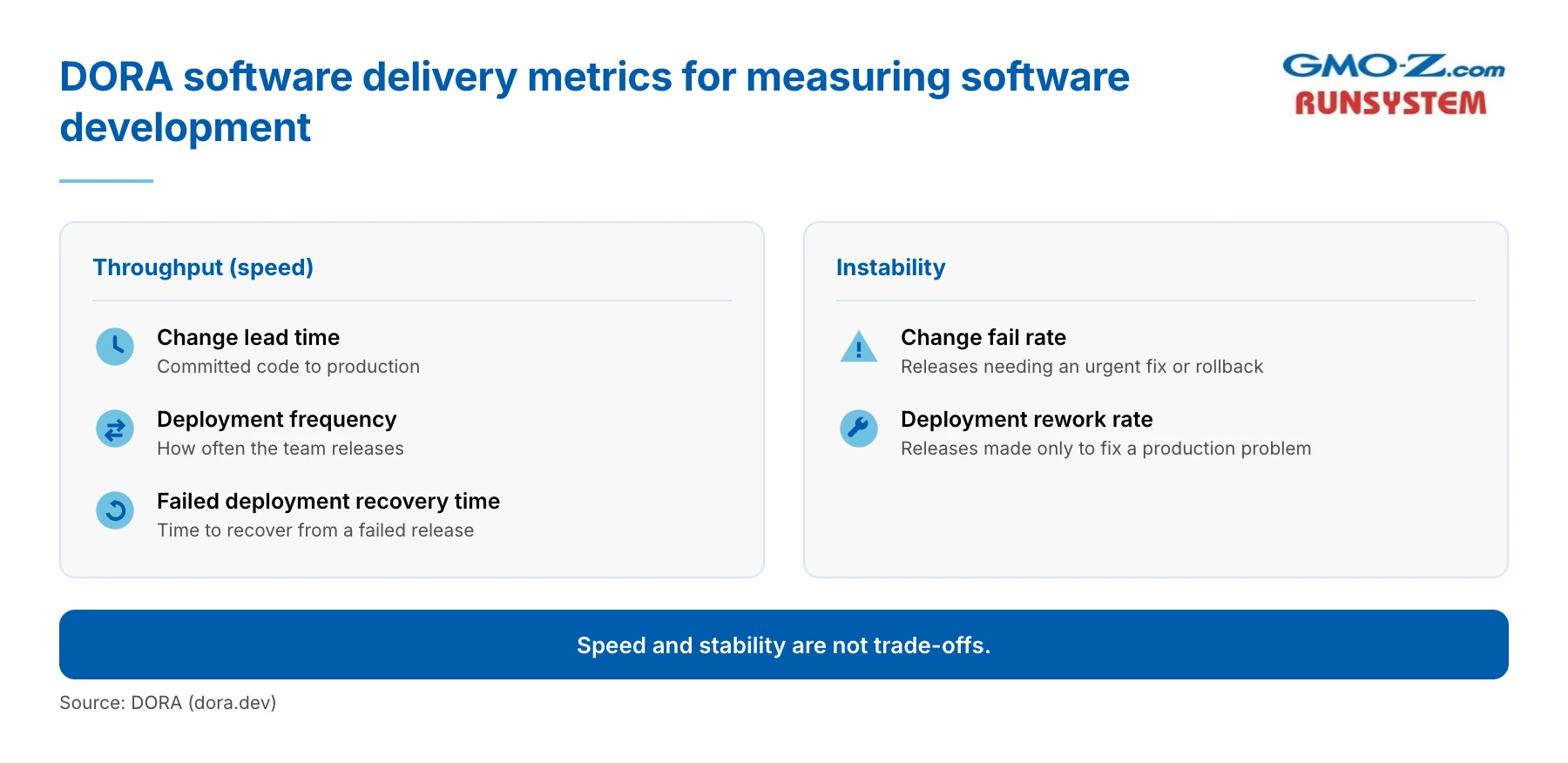
Ask any team, in-house or vendor, for these five numbers monthly for each system. DORA warns against turning them into targets, so use them to track one system over time.
Quality comes down to two things a buyer can check, technical debt and an audited process.
Technical debt is the future cost of rework created by shortcuts or dated design. It makes every later change slower. The Consortium for Information & Software Quality (CISQ) estimated the cost of poor software quality in the U.S. at $2.41 trillion in 2022, with accumulated technical debt of about $1.52 trillion.
Process maturity is the other signal. Capability Maturity Model Integration (CMMI) rates how well defined and measured a development process is. ISO 9001 certifies a quality management system. Outside auditors check both, so you can verify them. GMO-Z.com RUNSYSTEM has held CMMI Level 3 and ISO 9001 since 2012.
When a vendor shows you these, ask for the certificate numbers and check them with the body that issued them. A logo on a slide proves nothing.
Metrics show a project going wrong. The causes are usually older than the metrics.
Back to top
In practice, most software projects fail because of decisions made before or after the code, which is why the problems are hard to see while the code is being written.
Widely quoted failure rates come from studies that don't publish their full methods, so no rate appears here. The patterns below are more useful. Most of them are decisions a buyer makes or signs off on, which means a buyer can prevent them.
None of these five starts in Build, though the first one shows up there. That is why progress reports during coding rarely warn you in time.
Before you sign, turn each cause into a question and get a written answer.
Most of these trace back to one early decision. Should you build at all, and if so, who should build it?
Back to top
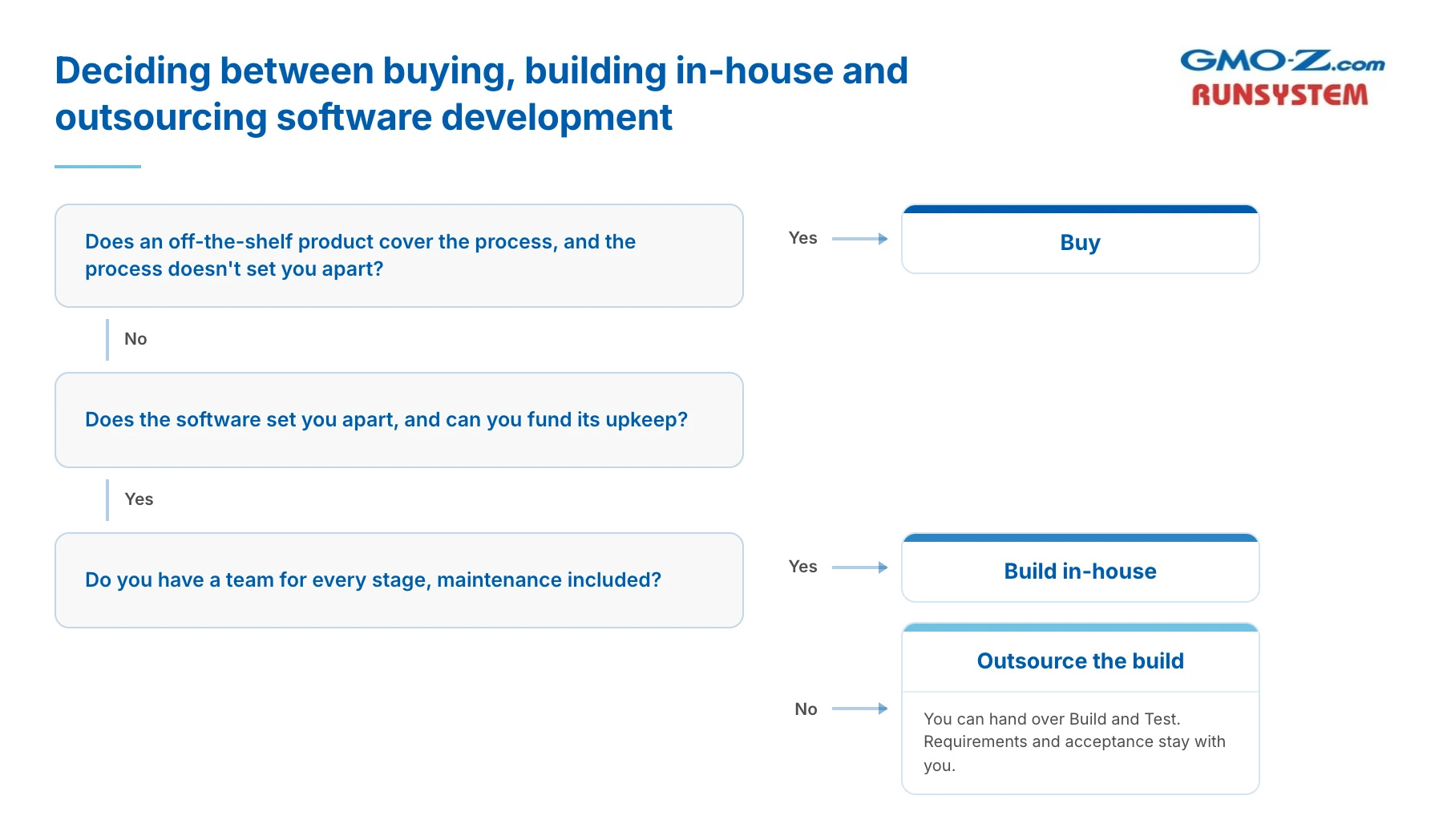
Buy off-the-shelf software when the process is standard, build when the software sets you apart and you can fund its upkeep, and outsource the build when you lack the team to do it.
GMO-Z.com RUNSYSTEM builds software for clients, so read this section knowing it comes from one of the three options it compares.
Buying is the fastest route to working software, though you live with how the product works. Someone else carries the maintenance and the security patches, and many other customers fund the product's future features. Building in-house gives you full control and keeps knowledge inside the company. It also means hiring and keeping a team for every stage, maintenance included. Building with a vendor gives you a team without the hiring, while the decisions stay yours.
If an off-the-shelf product covers the process and the process does not set you apart from competitors, buy it. Building is the slower and more expensive answer.
Outsourcing comes with one firm condition. You can hand a vendor the Build and Test stages. You can't hand over knowing what you need. Requirements decisions and acceptance stay with you, whoever writes the code.
If you've already decided to build and want a second view on scope, talk to our delivery team about your project.
Whichever route you take, decide it before you ask anyone for a quote.
Back to topSoftware development is a life cycle, so budget for its start and its end as well as the coding in the middle. Whatever type of software you need, it moves through six stages, and each one should produce something you can check. The right method depends on how stable your requirements are. Most roles and tools gather around Build and Test, and AI speeds up that middle part without touching requirements. Five delivery metrics show whether the work is going well, most failures start outside the code, and the first decision is whether to build, buy or outsource.
For your next project, write the six stage names on a page and put an owner next to each one. A stage with no owner is where the risk sits. If you'd like a second view on that page, we can go through the six stages with you at GMO-Z.com RUNSYSTEM.
Back to top