







Tổng hợp các lỗi trong nhập liệu & hướng dẫn cách khắc phục nhanh chóng
Data entry errors are common issues ranging from websites to Excel files, including formatting conflicts, incorrect fonts, or broken formulas. These issues can affect data quality and work efficiency. In this article, GMO-Z.com RUNSYSTEM summarizes the most common data entry errors and provides quick, practical solutions.
Quick summary: Common errors
Main causes
Error rate
Effective ways to reduce errors
|
1. Common data entry errors when publishing on websites & how to fix them
Below are common data entry errors on websites, their typical causes, and quick solutions to ensure text, images, and videos display correctly:
1.1. Formatting issues (also known as format errors)
This is one of the most common data entry errors, especially among beginners managing website content. The main cause is copying content directly from Word, Excel, or other websites and pasting it straight into the CMS.
Although this method is fast, formatting from the source often conflicts with website standards, leading to display issues such as:
- Default fonts being overridden
- Inconsistent font sizes
- Messy layout and misaligned spacing
- Hidden links or unwanted embedded code
How to check:
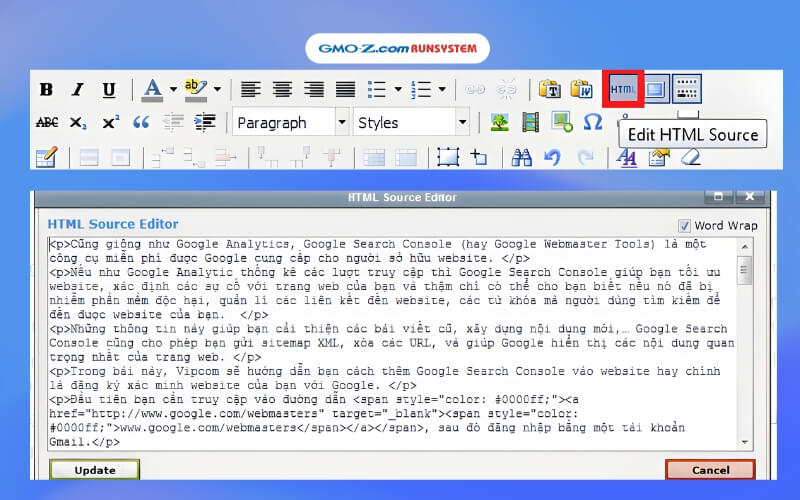
- In the editor, switch to the “HTML” view to inspect the source code.
- If the content contains many unusual tags or complex inline styles, formatting issues are likely present.
- Clean content usually includes only essential HTML tags.
How to fix: If content is drafted in Word, paste it into Notepad, the browser address bar, or a chat window to strip all formatting. Then copy and paste the clean text back into the website.
1.2. Font issues
In some cases, even after clearing formatting, text may still display incorrectly, such as:
- Inco
