Types of CRM Software: A Complete Guide to Choosing the Right CRM for Your Business
Share in
26-12-2025
Today, types of CRM software come in a wide range of features and use cases, from sales and marketing automation to end-to-end customer management. In this article, GMO-Z.com RUNSYSTEM walks you through the pros and cons of each CRM type and provides practical guidance on how to choose the right CRM system for your business helping you streamline operations, improve sales performance, and enhance the customer experience.
Quick Summary
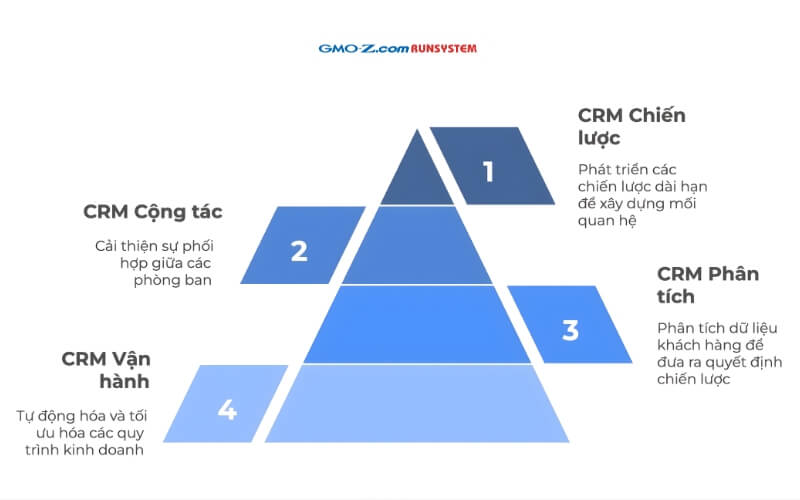
4 main types of CRM software:
Operational CRM
Analytical CRM
Collaborative CRM
Strategic CRM
Vietnamese businesses usually only need 1 of the following 2 options:
Small and Medium-sized Enterprises (SMEs): A CRM system that is easy to use, quick to deploy, and cost-effective—focused on customer management, sales pipeline tracking, and basic reporting.
Large enterprises: A highly flexible and customizable CRM system that integrates with ERP, accounting, and marketing platforms, supports big data analysis, automates complex workflows, and provides strong security to manage customers across multiple channels efficiently.
Below are the most widely adopted types of CRM platforms, along with the core features of each:
1.1. Operational CRM
Operational CRM focuses on automating and optimizing customer-facing processes such as sales, marketing, and after-sales service. This type of CRM system helps businesses improve productivity while delivering a better customer experience.
Key features:
Sales automation: Lead management, opportunity tracking, and automated quotation creation.
Contact management: Centralized storage of customer data, interaction history, and preferences.
Service management: Ticketing systems, live chat, and knowledge bases for faster issue resolution.
By using operational CRM, businesses can save time, reduce manual work, and focus on building long-term customer relationships.
1.2. Analytical CRM
Analytical CRM is designed to collect, process, and analyze customer data, enabling businesses to understand customer behavior, needs, and market trends in order to make data-driven strategic decisions.
Key features:
Data mining: Identifying patterns and trends in customer behavior.
Data warehousing: Storing and organizing data from multiple sources to create a unified customer view.
Behavior analysis: Measuring conversion rates, customer lifetime value, and satisfaction levels to optimize business strategies.
An analytical CRM empowers businesses to personalize experiences, increase engagement, and improve overall customer management effectiveness.
Collaborative CRM focuses on enhancing collaboration between internal teams and external partners, ensuring that all departments share consistent and up-to-date customer information.
Key features:
Interaction management: Tracking customer touchpoints across email, phone calls, and social media.
Communication channel management: Coordinating channels to deliver consistent and effective messaging.
Document management: Storing and sharing customer-related documents for quick and easy access.
With collaborative CRM, businesses can deliver seamless service, improve customer satisfaction, and strengthen customer loyalty.
1.4. Strategic CRM
Strategic CRM is centered on building and maintaining long-term customer relationships that create sustainable value for the business.
Key features:
Customer segmentation: Grouping customers based on characteristics, behavior, or needs for more targeted engagement.
Engagement strategies: Implementing programs and initiatives to increase customer loyalty.
Customer data management: Collecting, storing, and securing data to support long-term strategic decision-making.
A strategic CRM helps businesses optimize customer relationships, drive sustainable growth, and improve long-term profitability.
Common Types of CRM Software Today
2. How to choose the right CRM software for each business size
Below is a practical guide to selecting types of CRM software based on company size and real business needs:
2.1. Define clear goals and specific business needs
Before implementing a CRM system, businesses should clearly define the strategic objectives they want to achieve, such as:
Revenue growth: Effectively managing leads and optimizing the sales process.
Improving customer experience: Enhancing service quality, increasing customer satisfaction, and building long-term loyalty.
Data analysis: Leveraging customer data to make smarter decisions and forecast market trends.
Clearly defined goals help businesses choose the right CRM types and avoid wasting resources on unnecessary features.
2.2. Evaluate budget and total cost of ownership
When deploying a CRM system, the budget should include more than just the software license. Businesses need to consider the full cost, including:
Implementation and training: Ensuring employees can use the CRM system effectively.
Maintenance and technical support: Keeping the system stable and resolving issues promptly.
Scalability and upgrades: Supporting future growth and evolving business needs.
A thorough cost evaluation enables businesses to select the most suitable CRM system, optimize spending, and ensure long-term ROI.
2.3. Identify required features and integration capabilities
When choosing types of CRM platforms, businesses should clearly define the features and integrations that align with their actual needs. An effective CRM system goes beyond customer management. It streamlines processes and boosts productivity.
Key factors to consider:
Sales and marketing automation: Saving time and improving team efficiency.
Customer data management and analysis: Understanding customer behavior, needs, and trends.
Integration with existing systems: ERP, accounting, and email marketing tools to ensure seamless data flow.
Customization capabilities: Flexibility to adapt to specific business requirements.
Selecting a CRM with the right features helps businesses optimize operations, enhance customer experience, and drive sustainable growth across different CRM systems.
2.4. Compare and experience CRM software before deciding
Before making a final decision, businesses should take the following steps:
Use free trials: Experience the software’s features and user interface firsthand.
Attend demos or webinars: Understand how the CRM supports real business workflows.
Read user reviews: Gather unbiased insights into strengths and limitations from other users.
Compare options: Create a comparison table based on features, pricing, integration capabilities, and support services.
Hands-on experience combined with insights from multiple sources helps businesses choose the most suitable solution among different CRM systems.
Selecting the right types of CRM software according to company size helps optimize operations and ensure scalability.
Small and Medium-sized Enterprises (SMEs): SMEs should prioritize CRM systems that are easy to use, quick to deploy, and cost-effective. Core features should include customer management, sales opportunity tracking, and basic reporting.
Large enterprises: Larger organizations require highly flexible and deeply customizable CRM systems that integrate with ERP, accounting, and marketing platforms. Advanced capabilities such as big data analytics, complex workflow automation, and robust security are essential for managing omnichannel customer engagement effectively.
How to Choose CRM Software for Each Business Size
3. TOP 6+ most popular CRM software today
Below is a list of the TOP 6+ CRM types that are reliable, widely adopted, and trusted by many businesses today:
WOWCRM Software
WOWCRM, developed by GMO-Z.com RUNSYSTEM, a member of Japan’s GMO Internet Group, is a next-generation CRM system designed to optimize sales processes, deliver 360-degree customer management, and enhance omnichannel customer experiences. The platform integrates AikoAI, an AI-powered assistant that automates sales tasks, performs intelligent data analysis, predicts customer needs, and personalizes interactions, making it particularly suitable for BFSI, real estate, and retail industries.
Key features of WOWCRM:
Comprehensive customer management: Unifies data from multiple sources, synchronizes with Core Banking, LOS, and AML systems, builds 360-degree customer profiles, and accurately predicts customer needs.
Process automation: Reduces manual data entry time by 40%, automates reminders, quotation generation, and progress tracking, boosting productivity by up to 70%.
Optimized omnichannel customer experience: Tracks customer journeys, personalizes interactions, and increases customer lifetime value by 3–6 times.
AikoAI assistant: Analyzes data, recommends actions and types of CRM strategies, and supports sales teams in doubling conversion rates.
Reporting and access control: Intuitive dashboards, real-time reports, and flexible permission management enable faster, data-driven decision-making.
Real-world applications
ABBank and BAC A BANK have implemented WOWCRM integrated with AikoAI and achieved:
Automation of 90% of sales processes
40% reduction in manual data entry
Significant improvements in customer management efficiency and strategic decision-making
WOWCRM is developed by GMO-Z.com RUNSYSTEM
CloudGO CRM software
CloudGO is a reputable CRM system provider focused on customer management and business process automation. The platform features a user-friendly interface and is easy to use, while offering omnichannel integration with Facebook, Zalo, call centers, and email allowing businesses to synchronize customer data seamlessly across touchpoints.
Key advantages:
Centralized customer management: Easily access and update customer information in one place.
Process automation: Reduces manual workload in sales and customer care operations.
Reporting and analytics: Supports accurate, data-driven decision-making.
Omnichannel integration: Facebook, Zalo, email, and call centers to increase customer engagement.
Flexible connectivity: Synchronizes smoothly with ERP, accounting, and other enterprise systems.
High-level security: Strict permission controls to protect business data.
Anytime, anywhere access: Multi-platform support across devices.
CloudGO is suitable for various industries and business sizes, helping organizations optimize operational efficiency and enhance customer experience. However, for highly specific requirements or advanced features, additional time and customization costs may be required.
Apptivo CRM software
Apptivo is a comprehensive CRM system designed for small and medium-sized businesses as well as multi-industry organizations, enabling effective management of the entire customer journey. Its intuitive interface and flexible customization allow businesses to design data fields, reports, and workflows tailored to their specific needs—optimizing sales, customer service, and omnichannel engagement across email, phone, and social media.
Key advantages:
Customer and lead management: Tracks the full customer journey from lead generation to deal closure.
Task and project management: Create, assign, and monitor progress to improve work organization.
Sales pipeline management: Oversees each sales stage to improve conversion rates.
Process automation: Sends automated nurturing emails and marketing campaigns based on customer behavior.
Omnichannel integration: Synchronizes data from email, social media, and call centers.
Reporting and analytics: Smart dashboards support performance evaluation and data-driven decisions.
Strong data security: Robust permission controls and security mechanisms.
Flexible customization: Allows modification of interfaces, data fields, and workflows.
Multi-platform support: Manage customers anytime, anywhere across devices and operating systems.
Apptivo helps businesses improve operational efficiency, streamline business processes, and enhance customer experience. For highly complex customization needs or large-scale deployments, implementation may require additional time and cost.
Apptivo CRM Software
Salesforce software
Salesforce is a comprehensive CRM system that enables businesses to manage and grow customer relationships effectively. The platform seamlessly connects sales, marketing, customer service, and commerce teams—supporting fast information sharing, workflow optimization, and enhanced customer experiences, ultimately driving revenue growth.
Key advantages:
Flexible cloud-based platform: Access anytime, anywhere, with deep integration across various applications and systems.
Intelligent AI capabilities: Salesforce Einstein AI analyzes data, predicts customer behavior, personalizes experiences, and automates repetitive tasks.
Centralized customer management: Stores and segments customer data to support effective sales and marketing strategies.
Sales opportunity management: Tracks deal progress, forecasts revenue, and prioritizes high-potential leads to increase close rates.
Workflow automation: Automates emails, marketing campaigns, and customer care based on data and behavioral triggers.
Omnichannel integration: Email, social media, chatbots, call centers, and websites ensure seamless customer communication.
Reporting and analytics: Visual dashboards and trend forecasting support accurate, data-driven decision-making.
Quote and partner management: Automates quotation creation, synchronizes opportunity–product data, and improves internal and partner collaboration.
Customization and scalability: Allows interface and workflow customization with deep integration across the Salesforce ecosystem.
Salesforce CRM is suitable for businesses of all sizes, especially organizations seeking to optimize customer management, boost sales performance, and leverage advanced technology to strengthen competitive advantage.
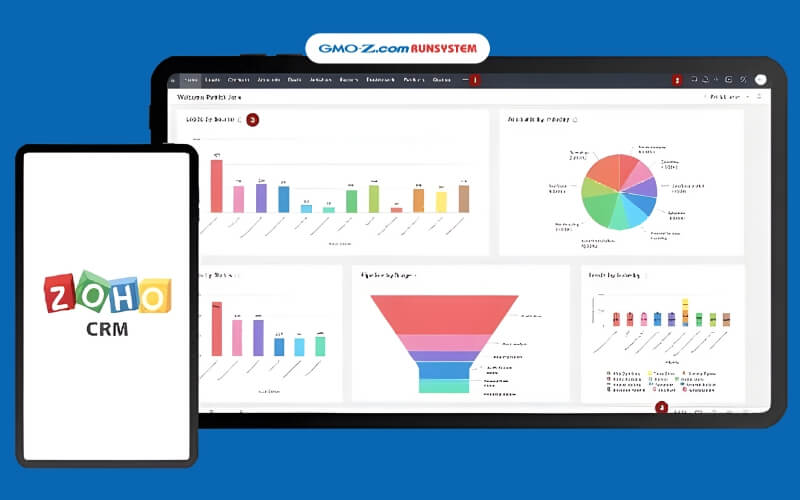
Zoho CRM Software
Zoho CRM is a customer relationship management platform trusted by over 100 million users worldwide. The software stands out for its intuitive, user-friendly interface and flexible customization, helping businesses optimize sales processes, customer service, and omnichannel engagement. Zoho CRM also integrates artificial intelligence (AI) to automate tasks, analyze data, and deliver accurate forecasts, enabling faster and smarter decision-making.
Key benefits:
Omnichannel integration: Email, phone, social media, and live chat to personalize customer experiences.
Deal and sales process management: Tracks pipelines, accelerates deal closures, sends automated reminders, and manages the full customer journey.
Automation and AI: Automates marketing emails, appointment reminders, lead scoring, and intelligent data analysis.
Team collaboration: Clear role-based permissions, shared data access, and real-time notifications for key events.
Analytics and reporting: Visual dashboards and sales forecasts support strategic planning based on real data.
High-level security: Two-factor authentication, encryption, and access control ensure data protection.
Mobile applications: Manage customers and tasks anytime, anywhere.
Thanks to its comprehensive feature set, Zoho CRM is suitable for a wide range of businesses from startups and SMEs to large enterprises, especially organizations that require a flexible platform that is easy to deploy and scale as they grow.
Zoho CRM Software
SugarCRM software
SugarCRM helps businesses simplify complex workflows and optimize customer management. This CRM system focuses on marketing automation, generating high-quality leads, and providing intelligent forecasting tools for sales teams, supporting pipeline management and fast, data-driven decision-making. Customer service teams benefit from an omnichannel platform that automatically routes requests and analyzes customer sentiment, enhancing satisfaction and experience.
Key advantages:
Customer and contact management: Easily store, update, and track communication history via calls, emails, and notes.
Sales management: Track leads, pipeline, business opportunities, score potential customers, and generate quotes and contracts.
Process automation: Automate workflows, alerts, approvals, and reporting to reduce manual work.
Omnichannel support: Email, phone, social media, SMS, and call centers improve communication efficiency.
Reporting and analytics: Intuitive dashboards and customizable reports track KPIs, revenue, and sales performance.
Mobile access: Available on iOS and Android, enabling customer management anytime, anywhere.
Security and permissions: Role-based access control ensures data safety.
System integration: Connect with ERP, accounting, websites, and other internal software via API/web services.
AI and smart forecasting: SugarPredict leverages artificial intelligence to analyze data, identify high-potential leads, and prioritize business opportunities.
With these comprehensive features, SugarCRM empowers businesses to improve sales efficiency, optimize customer care processes, and make data-driven decisions suitable for medium and large companies with advanced customer management needs.
5. Frequently asked questions
What are the essential features a CRM software should have?
An effective CRM system focuses on core functionalities to optimize business processes and customer service:
Lead and deal management: Track and score leads automatically, manage pipelines to identify opportunities for faster deal closure.
Process automation: Send personalized emails/SMS, schedule reminders, and manage customer care workflows.
Reporting and analytics: Visual dashboards display revenue forecasts, employee performance, and customer behavior for data-driven decisions.
Integration and collaboration: Connect with email, websites, and ERP systems; support teamwork, remote work, and secure data management.
Who uses CRM software?
CRM systems are suitable for all customer-related teams within businesses—from startups to large enterprises:
Sales teams: Manage leads, pipelines, and customer history to accelerate deal closures.
Marketing teams: Segment customers, run email/SMS campaigns, and analyze campaign performance.
Customer service teams: Handle tickets, monitor feedback, and track satisfaction.
Management/CEOs: Access real-time reports, forecast revenue, and monitor team performance.
Support departments (Accounting, HR, IT): Synchronize customer data, support operations, and maintain systems.
CRM is applicable for B2B/B2C businesses, retail, education, or organizations with large customer bases.
What are the benefits of using CRM software?
A CRM system centralizes customer data, automates sales and marketing workflows, increases revenue by 20–30%, and enhances customer experience:
Enhance customer care: Manage tickets, send personalized emails/SMS, and reduce churn by 15–25%.
Analytics and reporting: Visual dashboards monitor customer behavior and team performance for accurate decision-making.
Save time and costs: Automate data entry, integrate multiple channels, and increase productivity by 40%.
CRM allows businesses to capture trends promptly, drive sustainable growth, and maintain a competitive edge.
Choosing the right types of CRM software not only enables effective customer management but also optimizes operational workflows. To deploy quickly and fully leverage customer data, businesses can use WOWCRM by GMO-Z.com RUNSYSTEM. This platform integrates intelligent AI, automates sales and marketing processes, and offers 360° customer management, enhancing customer experience, boosting revenue, and improving operational efficiency. Experience WOWCRM today to transform the way your business manages and serves its customers.
What are CRM applications? CRM applications are software solutions that help businesses manage customer relationships, optimize sales processes, and enhance customer experience effectively.
What is a CRM database? A CRM database is a system that stores and manages all customer information, enabling businesses to optimize sales, marketing, and customer service more effectively.