Family site
Family site
Family site



System integration means getting separate systems to share data and act as one, so a record entered once shows up correctly everywhere it is needed.
Without it, one customer order lives in three places. Sales enters it in the CRM (customer relationship management system), and finance retypes it into the ERP (enterprise resource planning system). The warehouse works from a spreadsheet, so before long the three copies show three different totals.
This gap is common. According to MuleSoft's 2025 Connectivity Benchmark Report, the average enterprise manages 897 applications, and only 29% of them are integrated.
Most definitions stop at "connecting systems." The harder question is which system owns each piece of data, and that question often decides whether integration pays off.
Back to topSystem integration is the process of connecting separate hardware, software, and data systems so they share information and work as one coordinated whole, instead of operating in isolation.
An integrated system is the result of that process. Its parts behave like one system because data moves between them automatically, instead of someone copying it by hand.
In a business setting, system integration does three jobs:
The second job is the hardest, because it requires deciding data ownership before anyone writes a connector.
The term also carries different meanings depending on the field. The table below shows the three meanings that appear in search results:
Context | What gets integrated | Example | Covered in this article? |
IT and business | Applications, data, cloud services | CRM ↔ ERP ↔ warehouse system | Yes, main focus |
Systems engineering and defense | Subsystems of a product or program | Aircraft avionics | Briefly |
Buildings, AV, and smart homes | Devices such as access control, CCTV security cameras, lighting, and HVAC (heating, ventilation, and air conditioning) | One control panel for a smart building | Briefly |
In systems engineering, the Systems Engineering Body of Knowledge defines integration as assembling a system's implemented elements and verifying and validating them during assembly. In buildings and audiovisual (AV) work, the term means making devices from different manufacturers run from one interface. The rest of this article uses the IT and business meaning.
Back to topSystem integration makes systems work together as business events happen, while data integration and system implementation solve different problems. IBM describes data integration as combining and harmonizing data from multiple sources into a unified format for analytical, operational, and decision-making use. System implementation is narrower still, because it deploys one system.
The table below compares the three terms:
Term | Question it answers | Example | Typical output |
System integration | How do these systems work together as events happen? | A CRM order triggers an ERP invoice | Connected workflows and the connectors that run them |
Data integration | How do we combine data for analysis? | Sales and finance data loaded into a data warehouse (a central database built for reporting) | Data warehouse, dashboards |
System implementation | How do we deploy this one system? | Rolling out a new ERP | A configured, live system |
The distinction matters most in budgets, because an ERP project often contains both implementation and integration. The vendor configures the ERP, but someone still has to connect it to the CRM, the e-commerce platform, and the payroll tool.
If your project plan lists only implementation tasks, ask who owns those connections before you sign.
Back to topSystem integration methods describe how data travels between systems. None of them decides which system holds the authoritative copy, so two companies can use the same method and get very different results. Wikipedia's entry on system integration groups the classic methods into four types:
Vertical integration groups subsystems by function into separate stacks, often called silos. A silo is quick to build and involves only the vendors that one function needs. The weakness is reuse, because a new capability usually means building another silo instead of extending an existing one.
Point-to-point integration connects every system directly to every other system that needs its data. The approach works with two or three systems, but the number of connections grows quickly as you add more:
Connections = n × (n − 1) ÷ 2 6 systems = 15 connections. 12 systems = 66 connections.
Each connection needs its own code, testing, and monitoring, so maintenance cost climbs with every system you add.
Horizontal integration puts middleware, software that routes and translates data between applications, at the center of all systems. That central layer is called a hub or an enterprise service bus (ESB).
Each system needs only one connection to the bus, so 12 systems need 12 connections instead of 66.
The central layer carries its own risk, though. IBM notes that in many organizations the ESB "came to be seen as the bottleneck." A change to one shared integration could also destabilize the others that relied on it.
A common data format converts every system's data into one shared, application-independent model, often called a canonical model. Adapters, small components that convert one system's data format, translate to and from that model instead of between every pair of systems.
This method forces you to agree on what a "customer" or a "product" means across the business. That agreement is the ownership question most projects postpone.
The table below summarizes the trade-offs:
Method | Best for | Scalability | Maintenance cost | Main risk |
Vertical | One function, fast delivery | Low | Low at first, high later | A new silo for every new need |
Point-to-point | 2-3 systems | Low | Rises with every system | Spaghetti nobody fully understands |
Horizontal (ESB/hub) | Many systems, central control | High | Moderate | The hub becomes a bottleneck |
Common data format | Many systems sharing core data | High | Moderate | Needs strict data governance (agreed rules on who defines and changes data) |
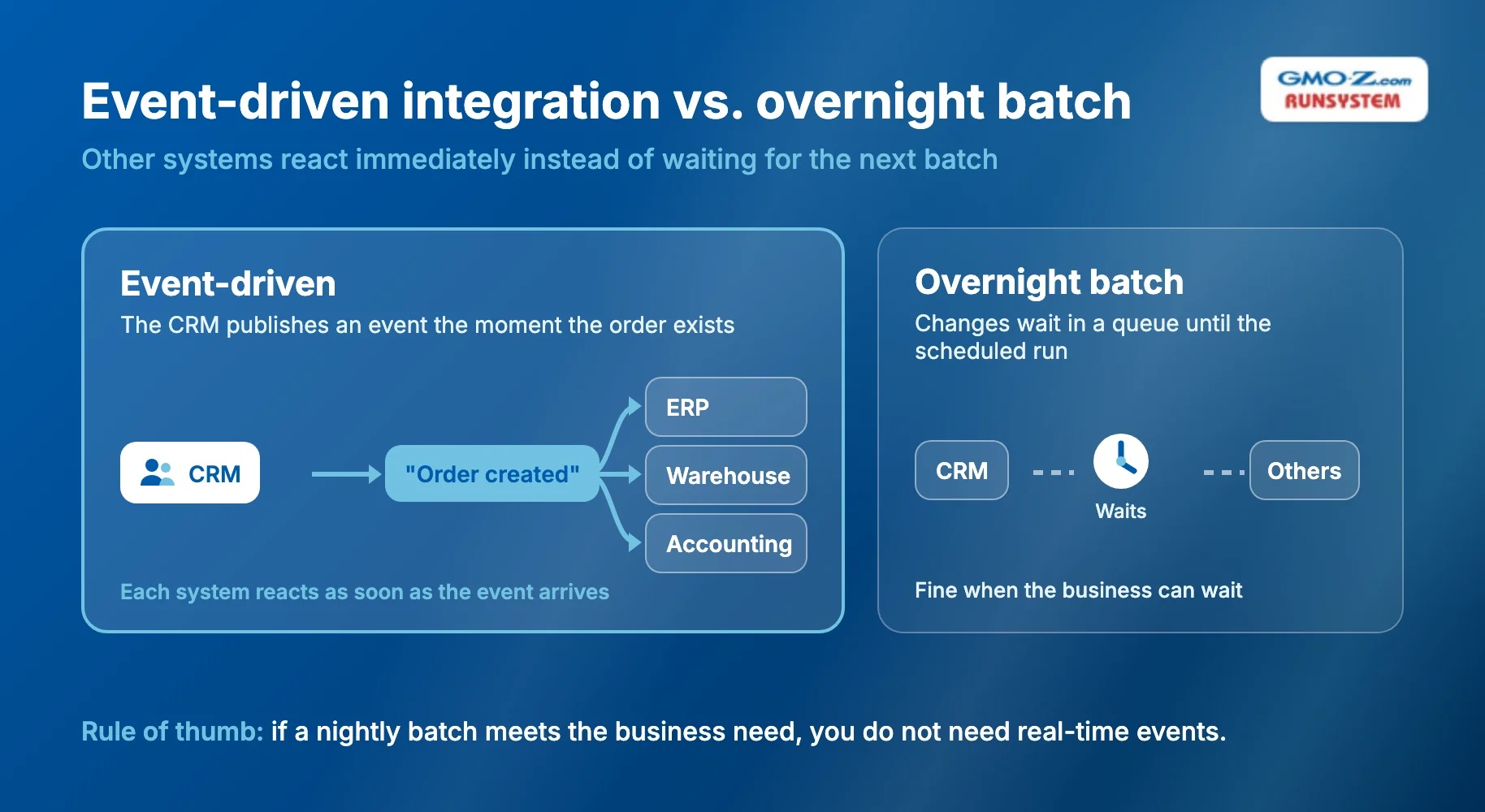
Modern integration approaches change the plumbing, but they leave the ownership question where it was. Teams now combine four approaches:
Custom connections still consume a large share of IT effort. The same MuleSoft report fou
nd that IT teams spend 39% of their time creating custom integrations.
Because custom work costs that much, choose the approach your team can sustain. Weigh three factors before you commit:
System integration is easiest to judge by what happens to one record as it moves through a workflow. The four examples below range from a back-office process to an app most people use every week.
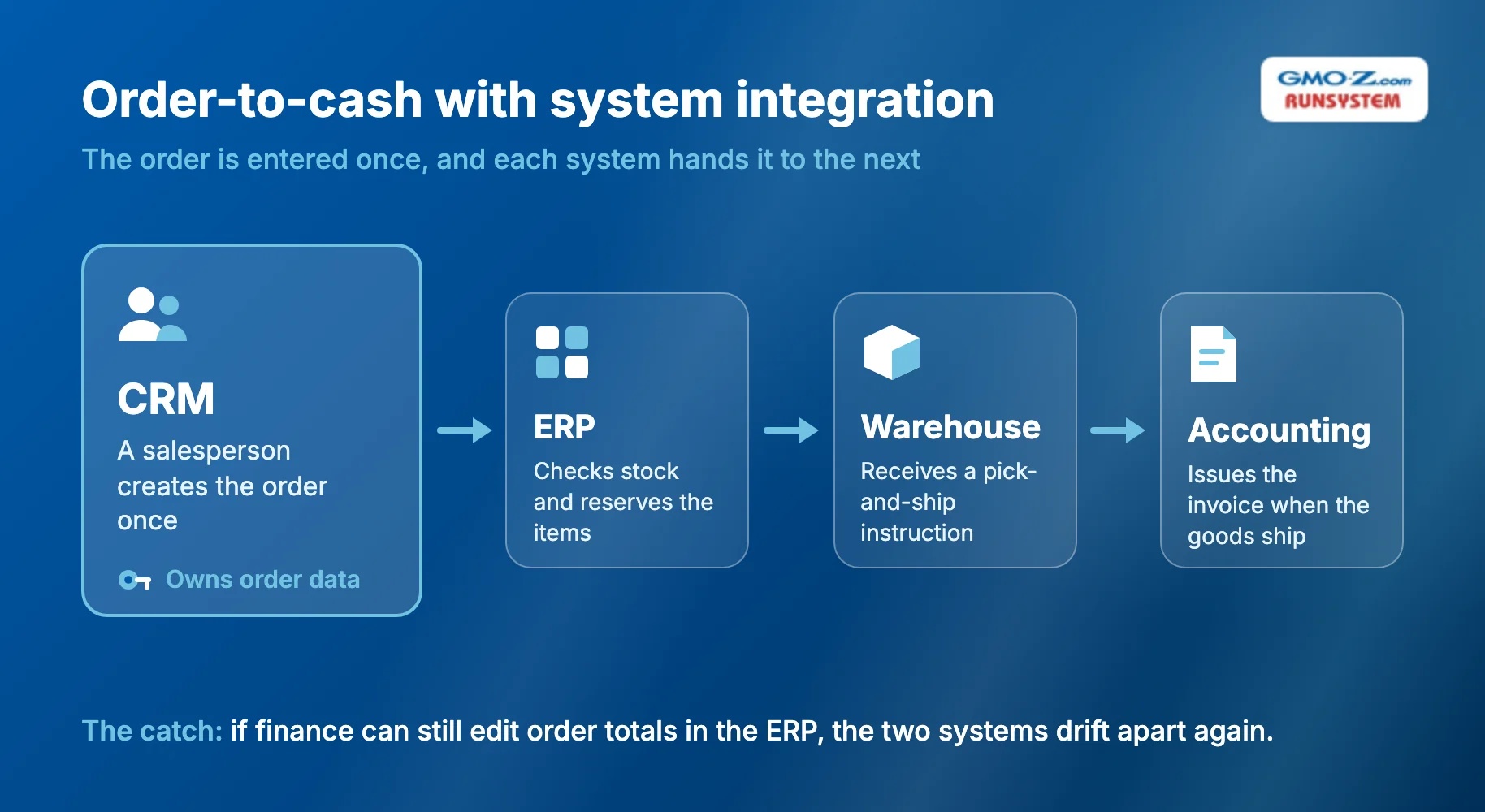
Order-to-cash is the workflow from a customer order to collected payment. With integration in place, each system hands the order to the next:
Without integration, each handoff means retyping. The calculation below uses assumed numbers for illustration, not a benchmark:
Manual re-entry time per day = orders per day × re-entries per order × minutes per entry 100 orders × 3 re-entries × 3 minutes = 900 minutes, about 15 staff-hours per day
That figure excludes the time spent finding and fixing typing errors.
After integration, the order is entered once, but only if everyone agrees the CRM owns order data. If finance can still edit order totals in the ERP, say to apply a late discount, the two systems drift apart again. The integration then copies the disagreement.
Banks typically connect the CRM to the core banking system, the platform that holds accounts and transactions. Relationship managers then see a customer's products and balances before a meeting, instead of requesting reports from another department. Compliance systems, such as anti-money laundering screening, can join the same flow.
Manufacturers commonly connect the ERP to two other systems. The MES (manufacturing execution system) runs the shop floor, and PLM (product lifecycle management) software holds product designs. Production orders flow down from the ERP, and actual output flows back up, so planners work from real numbers.
This connection is mature enough to have its own standard. ISA-95, from the International Society of Automation, defines the interface and the information shared between enterprise functions and plant control functions.
A ride-hailing app is an integrated system you can see on your phone. Maps, payments, identity checks, and push notifications come from separate services, yet they run as one booking flow. You never notice the seams, and that is the integration working.
Back to topData silos carry a real cost, and 90% of organizations in the MuleSoft study reported business obstacles caused by them. System integration removes those obstacles, but each benefit depends on a condition that projects often skip:
Benefit | The condition or catch |
No duplicate data entry | You need clean master data (core shared records such as customers and products) before you connect systems |
Real-time visibility | Real-time connections usually cost more to build and run than nightly batches |
Faster cross-team workflows | You must monitor every connection, or failures go unnoticed |
Lower cost than replacing systems | Integration debt (undocumented, overlapping connections) builds up if nobody governs new ones |
The challenge most teams underestimate is master data ownership, meaning which system may create and edit records such as customers and products. If both the CRM and the ERP can edit a customer's address, integration copies conflicting versions back and forth.
Gartner treats this problem as its own discipline, called master data management. As quoted by CIO, Gartner's definition centers on the "uniformity, accuracy, stewardship, semantic consistency, and accountability" of shared master data. You should name one owning system per data type before anyone builds a connector.
Security is the second challenge, because every integration opens a new path into your systems. The OWASP API Security Top 10 lists "unsafe consumption of APIs" among its 2023 risks, since developers tend to trust data from third-party APIs more than user input.
Each connection therefore needs its own credentials and access rules, and your team should validate incoming data as strictly as anything a user types.
Back to topA system integrator is the team that connects separately built systems and keeps those connections running. Demand for that work is large, and Grand View Research projects the global system integration market to reach USD 1,228.57 billion by 2033.
The integrator can be an outside company or an internal team, and a typical engagement follows five stages:
In IT, well-known system integrators include Accenture, IBM Consulting, CGI, and HCLTech, along with many mid-size and offshore vendors.
You are more likely to need an external integrator when the project involves many systems, a legacy platform, or limited in-house integration experience. Banking often combines all three.
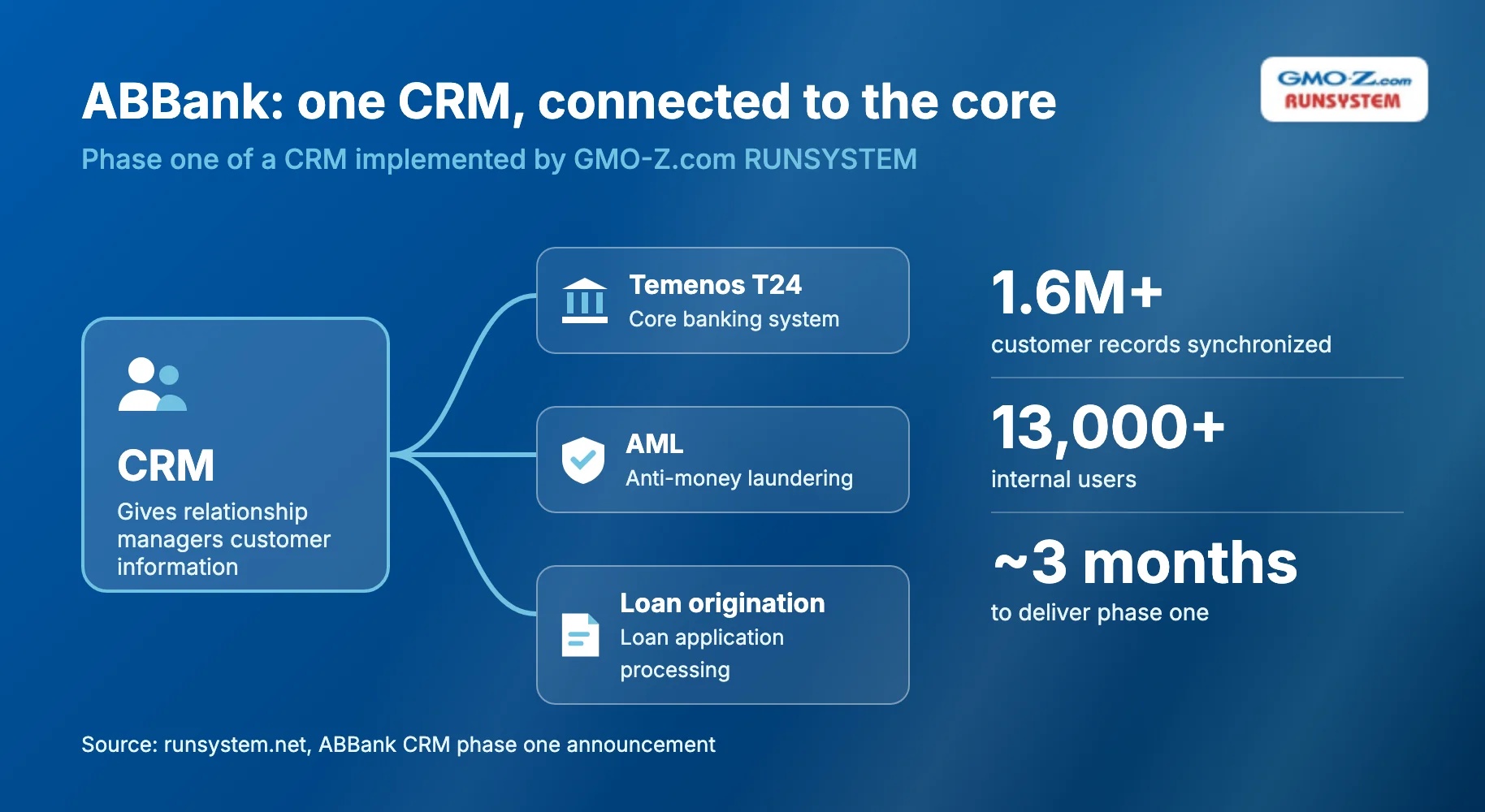
For example, GMO-Z.com RUNSYSTEM implemented phase one of a CRM for ABBank, a Vietnamese commercial bank, in about three months. The CRM connects to the bank's Temenos T24 core banking, AML (anti-money laundering), and loan origination (loan application processing) systems. It synchronized more than 1.6 million customer records for over 13,000 internal users.
 Back to top
System integration is likely worth the investment if any of these signs describe your organization:
To size the problem, run the re-entry formula from the order-to-cash example on your own volumes. Then write down which system owns each core data type, the step most projects skip. That list matters more than any choice of method or platform, because every connector you build later depends on it.
Once the numbers justify a project, the next questions are how big it should be and who should build it. Our guide to system integration services covers how to scope a project and what to ask a provider before you commit.
Back to topOrder-to-cash is a common example of system integration. A salesperson enters an order once in the CRM, and it flows automatically to the ERP, the warehouse, and accounting. At 100 orders a day, integration can remove hours of retyping.
An integrated system is a set of separate components that work as one system and share data automatically, without anyone copying records between them. In a ride-hailing app, for example, maps, payments, identity checks, and notifications run as a single booking flow for the user.
The four classic types are vertical, point-to-point (star), horizontal through an enterprise service bus, and common data format. Vertical is fast but builds silos; point-to-point gets hard to maintain past a few systems. Some guides group types by scope instead: legacy, enterprise application, third-party, and B2B (business-to-business) integration.
In business, system integration means connecting applications such as CRM, ERP, and accounting software so workflows run across departments without manual re-entry. It also means agreeing which system owns each type of data, so every team works from the same customer and order records.
Back to top