ファミリーサイト
ファミリーサイト
ファミリーサイト


Legacy system modernization should start with the systems that block your business today, not with the oldest code you own. That ranking often stalls, because most legacy systems still run and nothing forces a budget.
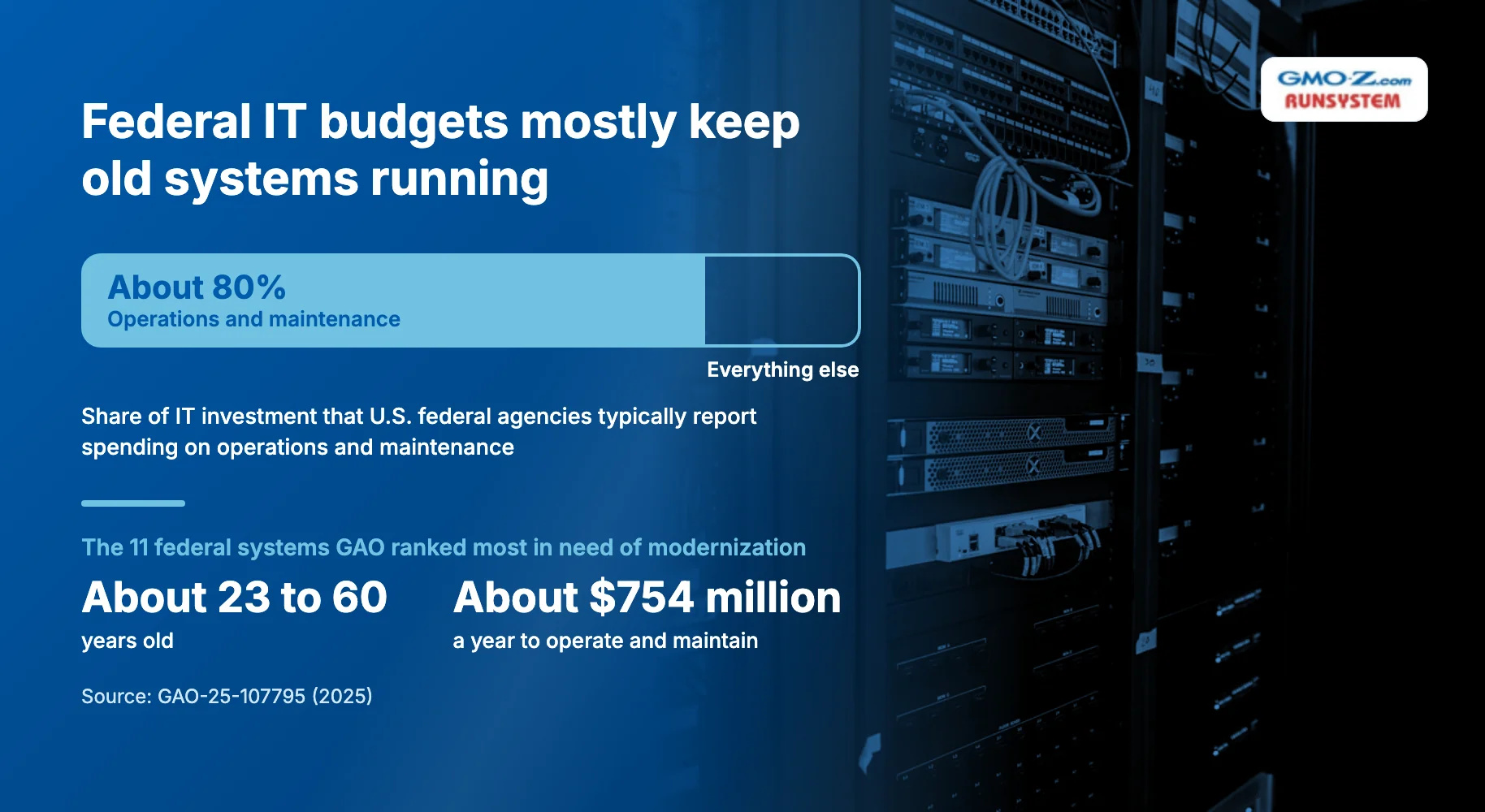
Waiting is the default even at the largest scale. According to the U.S. Government Accountability Office (GAO), federal agencies typically report spending about 80 percent of their IT investment on operations and maintenance. By February 2025, agencies had finished only three of the 10 critical legacy modernizations GAO flagged in 2019.
The way out is to rank before you rebuild. You score each system on business value and technical health, modernize the blockers first, and give every system you keep a review date. The sections below build that method, from warning signs to approaches, scoring, and a phased roadmap.
Back to topLegacy system modernization means updating or replacing outdated software, infrastructure, and data platforms to meet current business, security, and integration needs. It preserves the business logic and data built up over years.
A legacy system is any business-critical system that has become hard to change, support, or secure. Typical examples in mid-size and large enterprises include:
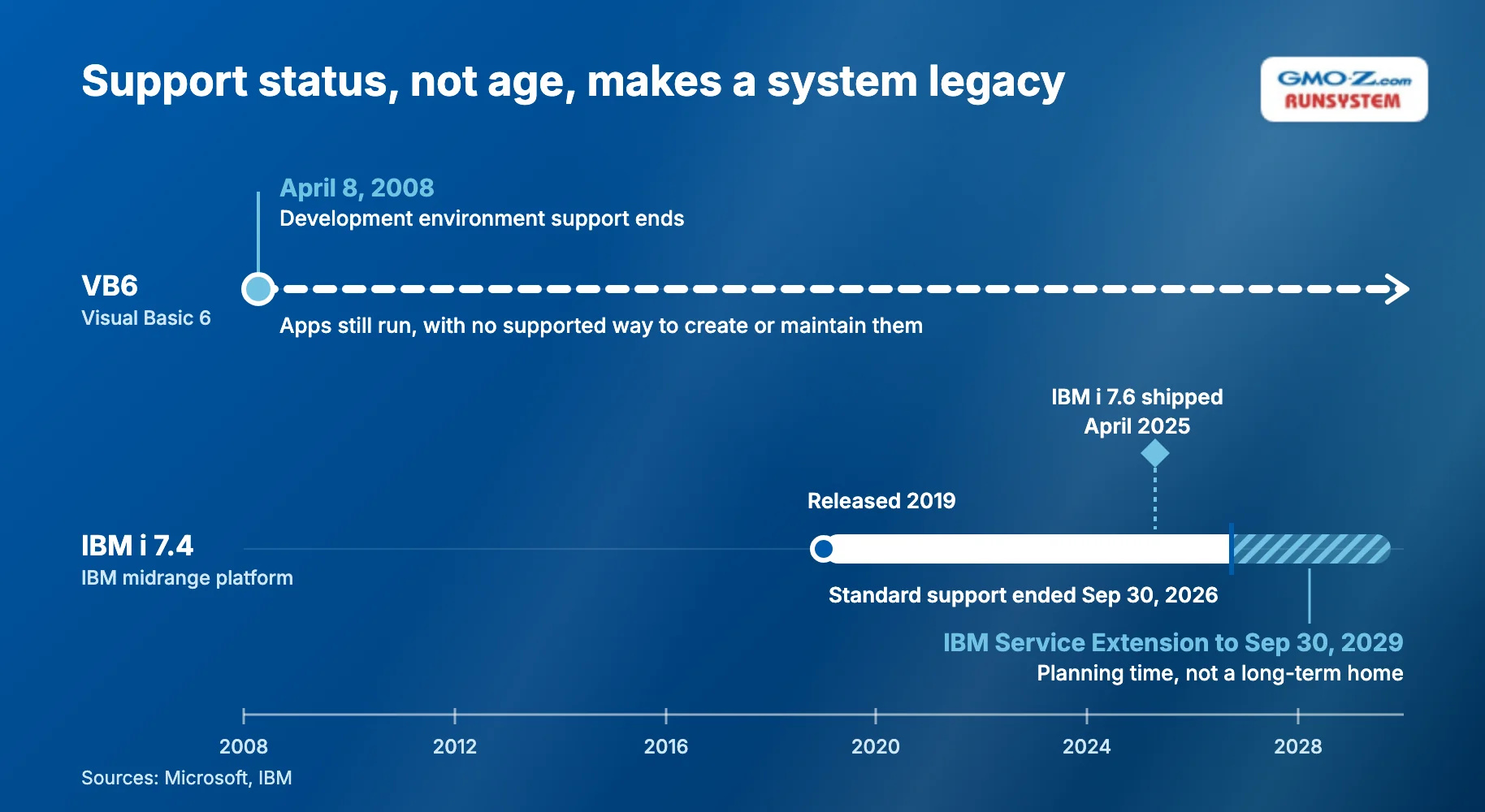
Support status is a better test than age for any of these. Microsoft stopped supporting the VB6 development environment on April 8, 2008. It now states there is "no supported method to create or maintain Visual Basic 6 applications," although those applications still run.
Support can also end on a fairly recent release. IBM shipped IBM i 7.6 in April 2025, yet IBM i 7.4, released in 2019, left standard support on September 30, 2026. So even a young system can turn legacy once standard support ends or nobody on your team understands it.
 Back to top
Legacy systems are widespread in large organizations, and the most detailed public data comes from U.S. federal agencies, where even critical systems run for decades. The 11 federal systems GAO ranked in 2025 as most in need of modernization range from about 23 to 60 years old. Together they cost about $754 million a year to operate and maintain.
In the private sector, the same burden shows up as technical debt, the accumulated cost of shortcuts and outdated technology that someone must fix later. A 2020 McKinsey article cites a survey that puts a number on it. CIOs (chief information officers) reported that 10 to 20 percent of their new-product technology budget is diverted to resolving technical debt issues.
Analysts now frame that debt as a business problem. Gartner tells infrastructure and operations leaders to reposition technical debt "as a business risk and not a technology risk." It calls that debt "a direct barrier to strategic AI platform investment and deployment."
For your organization, the useful figure is your own split between run cost (keeping current systems running) and change budget (building anything new). The signals in the next section tell you when that split has tipped too far.
 Back to top
Modernize a legacy system when it shows two or more of the signals below. They fall into three groups, plus a formula that prices the wait:
Three technical signals matter most:
Business signs show up in budgets and in daily work:
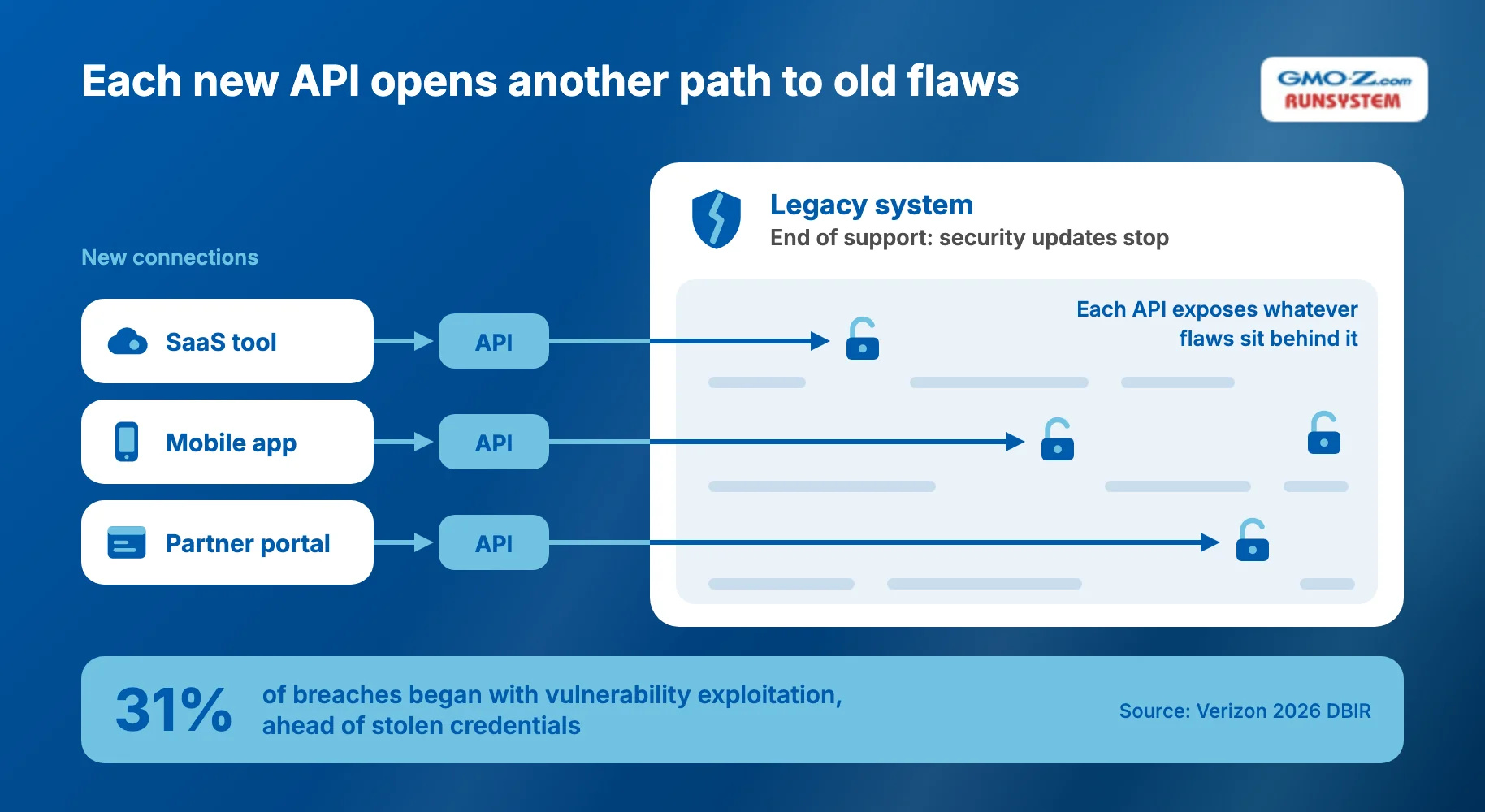
Legacy security won't scale in 2026 because software flaws are now the attackers' top way in, and unsupported systems stop getting fixes. Verizon's 2026 Data Breach Investigations Report, based on 2025 data, found 31% of breaches began with vulnerability exploitation, ahead of stolen credentials.
Older systems also struggle with zero trust, which NIST defines around protecting "users, assets, and resources" rather than network perimeters. Agencies told GAO that eight of the 11 most critical federal systems cannot implement zero trust without modernization. One agency cited missing MFA (multi-factor authentication).
Every API, a connection point other software calls, widens an older system's attack surface, the points an attacker can probe. Each one exposes whatever flaws sit behind it. GAO found known vulnerabilities in 7 of those 11 systems, so those flaws may already be on record.
This formula gives your CFO (chief financial officer) a number:
Annual cost of waiting = Extra run cost + Workaround labor + Delayed-change cost + Expected incident cost (probability × impact)
You can estimate each variable with your finance team:
Modernization approaches differ mainly in how much of the system changes. That sets their speed and risk.
The eight approaches covered here overlap with the "7 Rs," a common shorthand for modernization options. Our legacy application modernization guide covers each R in depth, so this section stays at the portfolio level.
The table below compares the eight approaches by scope, speed, risk, and fit, rating them against one another rather than against measured benchmarks:
Approach | What changes | Speed (relative) | Risk (relative) | Choose it when you |
Encapsulate (API layer) | Nothing inside; you wrap the system in APIs | Fast | Low | Need to expose data to new channels quickly |
Rehost | Infrastructure only; the system moves as-is | Fast | Low | Are leaving aging hardware or a data center |
Replatform | Runtime (the layer that executes code) or database, with minimal code change | Medium | Medium | Want to cut license and operations cost |
Refactor / re-architect | Code restructured, often with a new architecture | Slow | Medium to high | Own a system that changes often |
Rebuild | Everything, written from scratch | Slowest | High | Depend on the system as a core differentiator |
Replace (SaaS/package) | The system is swapped for a product | Medium | Medium | Run a commodity function such as HR or customer relationship management (CRM) |
Retire | The system is removed | Fast | Low | Find little remaining business value |
Retain | Nothing, for now | Not applicable | Rising over time | Have a stable, low-risk system |
Encapsulation, rehosting, and replatforming leave business logic intact. That makes them fast and low-risk, but hard-to-change code stays in place.
Rebuild sits at the far end of the table, and McKinsey treats a new "greenfield stack" (systems built from scratch) as "a last resort." Keeping old systems has a limit too. By McKinsey's measure, their risk and cost start to outweigh their benefits once technical debt passes half of a division's technology asset value.
Retain is a valid choice when you can state why and set a date to revisit it. A system you retain with no review date risks becoming the next emergency.
Avoiding that outcome means deciding which systems get which approach, and in what order.
Back to topModernize first the systems that score high on business value and low on technical health. Formal scoring has a public precedent. GAO ranked 69 federal legacy systems on 16 attributes, including age, vendor support, legacy programming languages, cybersecurity risk, and operating costs.
Ranking your own portfolio takes three steps:
In the worksheet below, you score seven criteria from 1 to 5, grouped into two axes:
Axis | Criterion | Score 1 to 5 |
Business value | Revenue or operations that depend on it | |
Business value | Number of users and processes it touches | |
Business value | Strategic importance over the next 3 years | |
Technical health | Vendor support status (5 = fully supported) | |
Technical health | Ease of change (5 = easy) | |
Technical health | Integration readiness (5 = APIs available) | |
Technical health | Security and compliance fit |
Treat business value of 10 or more out of 15 as high, and technical health of 10 or less out of 20 as low. Score with both the business owner and an engineer in the room, because each side may overrate its own axis.
These thresholds are a starting point. Adjust them once you see how your scores cluster, but keep them fixed during a ranking round so every system faces the same bar.
The Gartner TIME model (Tolerate, Invest, Migrate, Eliminate) is a portfolio framework that places each system on two axes. SAP LeanIX describes it as a matrix of technical fit, how sound the technology is, against functional fit, how well the system serves the business. Those two axes match your technical health and business value scores, so the worksheet feeds the matrix directly:
Low technical health | High technical health | |
High business value | Migrate (modernize first) | Invest (extend) |
Low business value | Eliminate (retire) | Tolerate (retain and monitor) |
In TIME, "Migrate" means moving the business capability to a better technical base, so rehosting, replatforming, refactoring, rebuilding, or replacing can all apply. Because these systems are both valuable and fragile, your modernization budget goes to the Migrate quadrant first. Eliminate systems free up budget, and Tolerate systems get a review date.
Rerun the matrix every budget cycle. A support deadline, a new regulation, or an acquisition can move a system from Invest to Migrate within a single year.
Before you lock the sequence, adjust it for two constraints:
A phased legacy system modernization roadmap avoids betting everything on one cutover, the switch from the old system to the new one. It splits the work into four smaller decisions, each gated by its own exit test:
Build an inventory of components, a dependency map, and notes from SME (subject-matter expert) interviews before you choose an approach. Record every integration and batch job (a scheduled, unattended task such as a nightly export), since a hidden one can surface as a cutover outage.
Martin Fowler, who writes about software architecture, explains why this step is harder than it looks. "Replacements seem easy to specify, but often it's hard to figure out the details of existing behavior," he writes.
Pick a module with clear business value and few dependencies. Measure a baseline first, such as lead time for a change (days from request to release), defect rate, and monthly run cost.
Without that baseline, you cannot prove the pilot worked. A measured, visible win makes the case for the next phase.
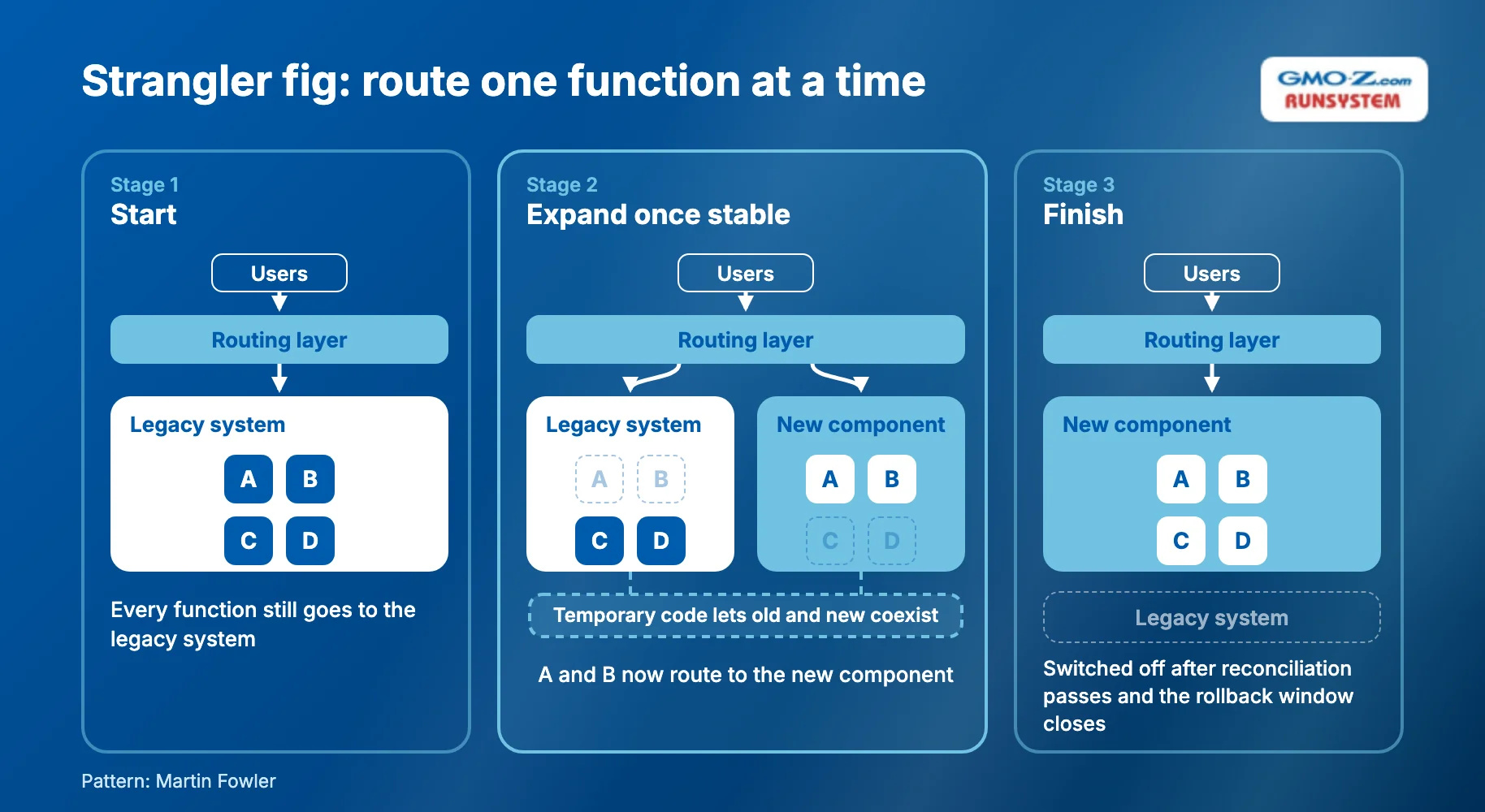
The strangler fig pattern replaces a legacy system piece by piece while the old system keeps running. Fowler took the name from a vine that gradually replaces its host tree. In practice, you route one function at a time to the new component, then expand once it proves stable.
The pattern needs temporary code that lets the old and new systems coexist. Fowler argues that the lower risk and earlier value outweigh its cost.
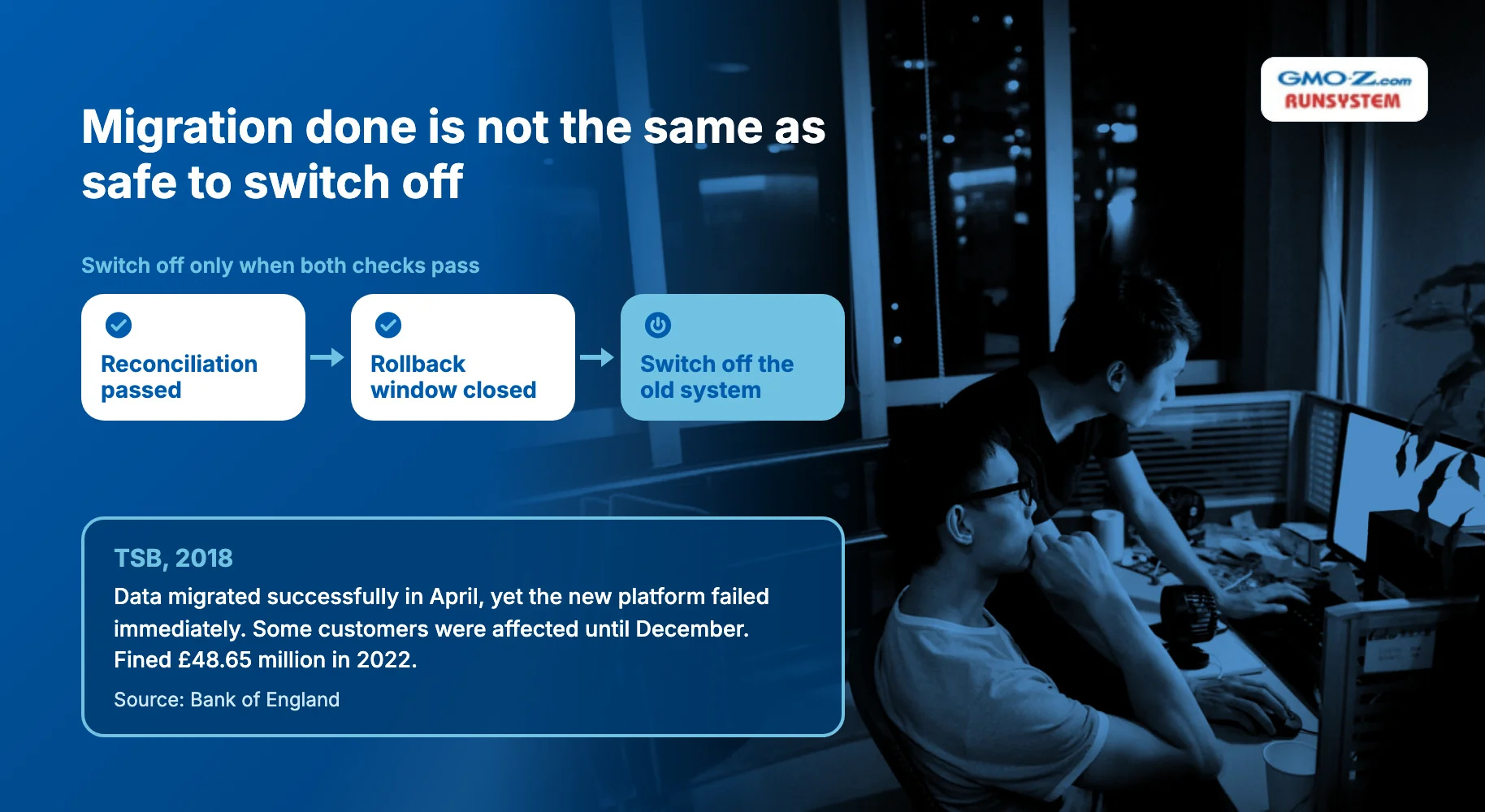
Run data reconciliation, an automated comparison of records between the old and new systems, before the cutover. Clean data alone does not prove readiness, as TSB, a UK bank, learned. Its data migrated successfully in April 2018, yet its new platform failed immediately.
Some TSB customers were affected until December 2018, and in 2022 regulators fined the bank £48.65 million, according to the Bank of England.
Keep a rollback window, the period when you can still revert. Switch off the old system only after reconciliation passes and that window closes. Write the rollback steps before cutover day, not during it.
Phase 4 is where a gap between "migration done" and "safe to switch off" hurts most. When you assess a migration partner, ask where testing sits in their process and who signs it off. The System Migration process at GMO-Z.com RUNSYSTEM, for example, makes data-integrity and compatibility testing its own phase, after migration and before deployment.
Back to topMost modernization risks are predictable, starting with weak planning. Of the 11 federal systems GAO ranked most in need of modernization, only three had fully documented modernization plans.
Five risks recur across programs, and each has a control you can put in place before your team writes new code:
These controls cost time up front, but they spread the effort across the program instead of saving it for one big push. McKinsey warns that infrequent IT megaprojects pose "high execution risk." It recommends paying down technical debt "consistently, predictably, and over a strategic time horizon" instead.
The controls also reinforce one another. A regression suite gives reconciliation a reference for correct output, and SME sessions give the regression suite its test cases.
The five controls map to four points on the roadmap:
Four trends are changing how enterprises modernize legacy systems in 2026:
None of these trends changes the ranking logic. AI speeds up discovery and test generation, but your team still has to validate its output against real system behavior.
Use these tools to move faster through phases 1 and 3, not to skip scoring. Ask any vendor pitching AI conversion how it proves the converted code behaves like the original.
Back to topModernization works best as a ranking exercise followed by phased delivery. Score each system on business value and technical health, map it on the TIME matrix, and modernize the Migrate quadrant first. Then deliver in gated phases, so no single cutover carries the whole program's risk.
Ranking alone does not get systems modernized. Federal agencies had finished only three of 10 critical modernizations nearly six years after GAO flagged them.
Not every system needs to change this year. Each system you keep needs a review date, because support dates and attack patterns keep moving even when your code does not.
Your first pass through the portfolio fits in one quarter:
The result gives your CFO a ranked case instead of a wish list.
If you want a second opinion before you commit budget, talk to the GMO-Z.com RUNSYSTEM System Migration team. Its process starts with an analysis phase that covers system and data complexity, potential risks, and the migration options that best fit your business.
Back to topShort answers to four common questions follow:
Common legacy system examples include custom ERPs on aging technology stacks, Oracle Forms applications, AS/400 (IBM i) systems, VB6 applications, and COBOL mainframes. Each is still business-critical but has become hard to change, support, or secure. Microsoft, for instance, stopped supporting the VB6 development environment in April 2008.
A full legacy system modernization program for core systems often takes several years, which is why phased delivery matters. GAO flagged 10 critical federal modernizations in 2019. Of the seven still unfinished in February 2025, agencies planned to complete two in five or more years.
Legacy system modernization covers the whole system, including infrastructure, data, integrations, and applications. Legacy application modernization focuses on the code and architecture of individual applications. System-level decisions come first, because they set which applications you rehost, refactor, replace, or retire.
Maintaining a legacy system is usually cheaper in the short term, so compare both options over three to five years. Weigh the annual cost of waiting against the modernization cost. Incident cost alone can tip that comparison, since IBM puts the 2026 global average breach cost at $4.99 million.
Back to top